One UI 9 Finally Lets You Hide Split-Screen App Handles

SammyGuru is reader-supported. We have affiliate and sponsored partnerships, so we may earn a commission when you buy through links on our site — at no extra cost to you. Learn more.
Samsung made a key change to its multitasking system in Android 17-based One UI 9. The new software finally gives you the option to hide split-screen app handles. This means now, when you use the Multi Window feature on your Galaxy device, you can get a cleaner interface.
Samsung improves the multitasking experience in One UI 9
Samsung recently announced the One UI 9 beta program for the Galaxy S26 series. While the company mainly highlighted key changes and new features in the official changelog, there are also some smaller improvements. One such change is seen in the Multi Window mode.
For the uninitiated, Multi window is a multitasking feature that lets you run two apps at once on a single screen. You can use apps in split-screen view or open them in pop-up windows. It comes in handy for different situations, such as browsing the web while chatting and watching videos while taking notes.
In split-screen mode, Samsung shows small app handles (thin bars) at the top of each window. Tapping on that handle presents a small menu with several icons. They let you quickly switch apps, open the app in pop-up view, maximize the window, or close the app.
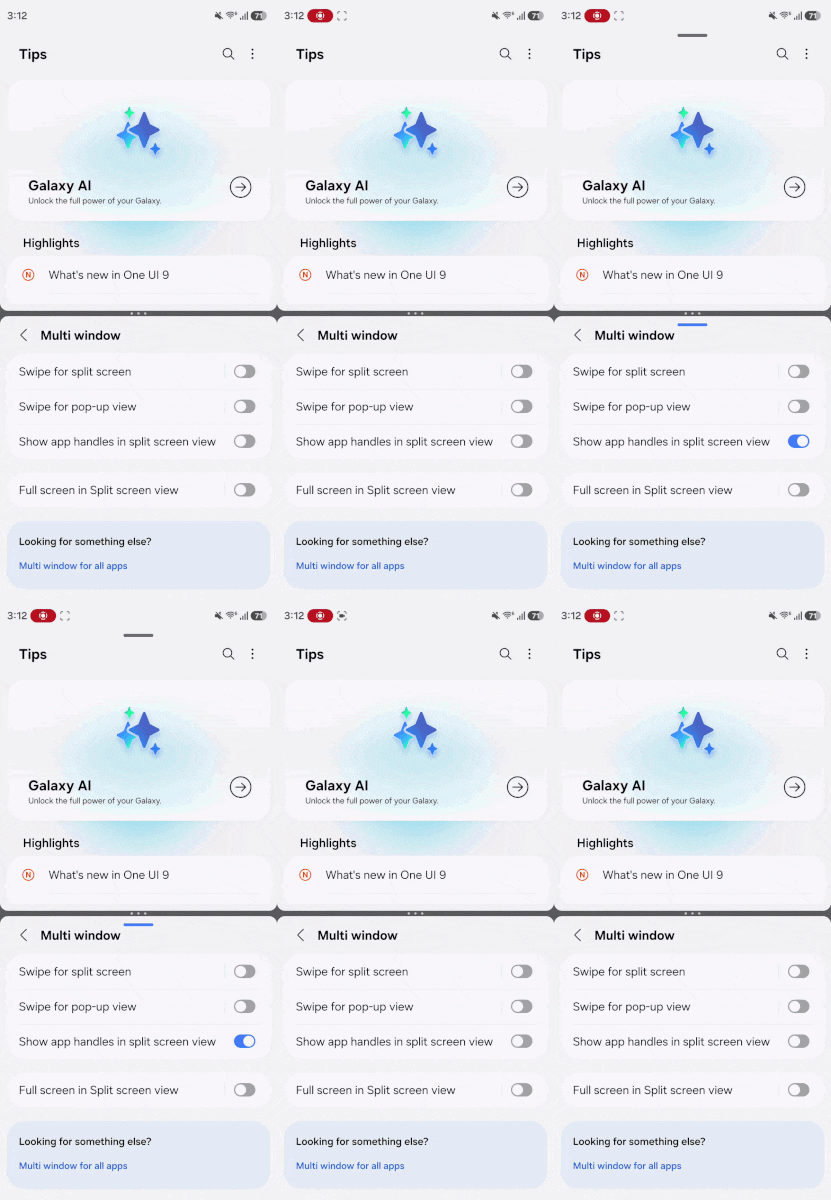

Of course, these controls are useful if you frequenty multitask on your Galaxy devices. However, some may not like seeing the handles all the time. Since they remain visible on the screen, the interface looks cluttered. That is what Samsung has addressed with One UI 9.
The Korean firm has introduced a new option, “Show app handles in split screen view,” in the Multi Window settings. You can find this toggle via Settings > Advanced features > Multi window. When you turn the option off, the system hides the app handles completely for a better multitasking experience.
The official version of One UI 9 could go official in July 2026 alongside next-gen Galaxy foldable smartphones. Since the feature is already available in the beta build, it should be part of the stable release as well.

Written by
Binay KonwarBinay Konwar started his blogging journey in 2014 and has since written plenty of tech articles. At present, he is working as a News Writer at SammyGuru, covering everything about Samsung. He holds a Master's degree in Mathematics, but his real passion lies in tech and writing. In his free time, he enjoys playing chess and watching movies.

Follow us on Google Discover & set us as a preferred source in Google News
Share this Post
___________________________


New Blog Posts
___________________________
Galaxy S22 Gets June 2026 Update in the US, All But Confirming One UI 8.5 Isn’t Coming
The S22 lineup wasn’t expected to receive a software update this month
Don’t Wait for Galaxy A27, Galaxy A37 is a Much Better Deal
Don’t miss this Galaxy A37 deal if you want a solid budget phone

Samsung Wins Top Honor in Home Appliance After-Sales Service
This is the second consecutive year for such recognition