Samsung Browser Updated with New Features on Mobile and PC
SammyGuru is reader-supported. We have affiliate and sponsored partnerships, so we may earn a commission when you buy through links on our site — at no extra cost to you. Learn more.
Samsung has updated both the mobile and PC (Windows) versions of its Browser app. The updates bring new useful features alongside fixes for security vulnerabilities. The company appears to be rolling out the latest versions to all eligible devices around the world.
What’s new in the Samsung Browser updates?
For the uninitiated, Samsung Browser is available on Android smartphones, tablets, and Windows PCs. This lets users browse the internet across different devices with a connected experience. For example, you continue browsing a webpage from your phone on your PC without needing to search for it again. Likewise, bookmarks and browsing history are also synchronized across devices.
Moreover, the browser offers several privacy-focused tools, including ad blocking and anti-tracking protection. Now, Samsung has pushed new updates for both platforms to improve the browsing experience.
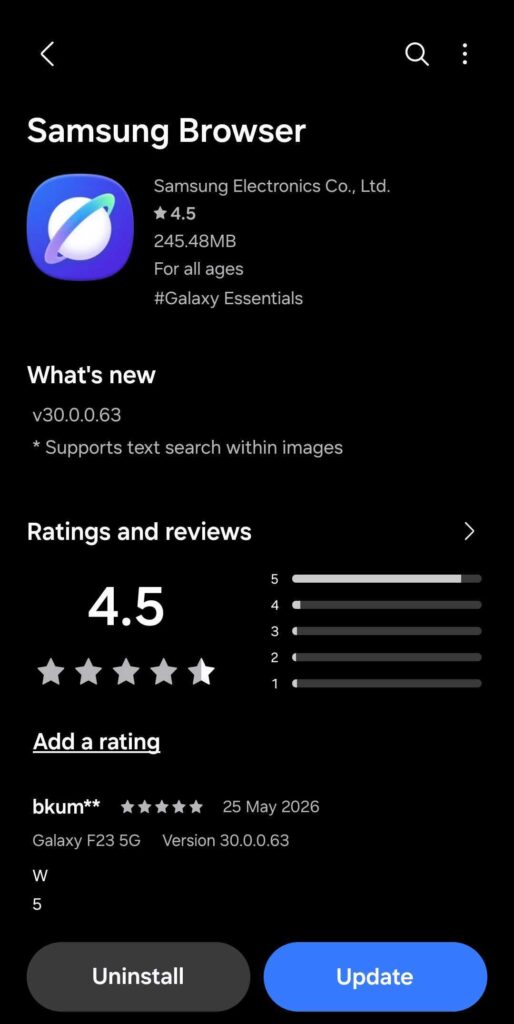
On mobile devices, Samsung has updated the browser to version 30.0.0.63. The update brings a new feature that lets you search for text within images in the Find on the page menu. This probably means that if a webpage contains an image with text, the browser can detect the text, helping locate information quickly.
On Windows PCs, Samsung has updated the browser to version 30.0.1.40. This update brings the ability to install websites as apps. That likely means when you now come across a supported website, you will see an option to install it as an app. This will allow websites (for example, Spotify) to open in their own separate window, similar to a desktop application.
In addition, the update includes fixes for security vulnerabilities. This should help protect users from possible threats, offering a reliable browsing experience on the desktop.
You usually don’t need to do anything to get the latest version. Samsung updates its browser in the background when the device is connected to the internet. However, you can confirm the version from the settings page in the “About Samsung Browser” section.

Written by
Binay KonwarBinay Konwar started his blogging journey in 2014 and has since written plenty of tech articles. At present, he is working as a News Writer at SammyGuru, covering everything about Samsung. He holds a Master's degree in Mathematics, but his real passion lies in tech and writing. In his free time, he enjoys playing chess and watching movies.

Follow us on Google Discover & set us as a preferred source in Google News
Share this Post
___________________________


New Blog Posts
___________________________
Introducing SammyGuru Rewards — Read, Earn, and Redeem
Our biggest update yet

Samsung’s Odyssey G8 Will Power Crimson Desert Demos at Gamescom 2026
In Cologne, August 36-August 30
Galaxy S25+ and Galaxy Tab A11 Are Cheaper Than Ever at Walmart
Your wallet will thank you