
Galaxy S26 Ultra vs OPPO Find X9 Ultra Camera Comparison: RAW Capture
While Auto mode is designed to deliver the best possible image with minimal effort, RAW photography exists for an entirely different reason. This mode isn’t about producing the most attractive image straight out of the camera, but about preserving information. Sharpness, color, noise, and detail still matter, but the real value of RAW lies in editing flexibility, recoverable data, dynamic range, workflow freedom, and how much control photographers have over the final image.
Before continuing, it is important to clarify that this comparison focuses only on the primary RAW workflows available on both devices. Specialized modes, including Samsung’s more advanced computational RAW options and future special shooting workflows from OPPO, will be covered separately because they operate under different processing philosophies.
Samsung Gives Photographers More Than One RAW Philosophy
Most smartphone manufacturers treat RAW as a single feature. Samsung treats RAW as multiple workflows designed around different types of photographers. The Galaxy S26 Ultra effectively offers two distinct RAW experiences within Samsung’s own camera ecosystem.
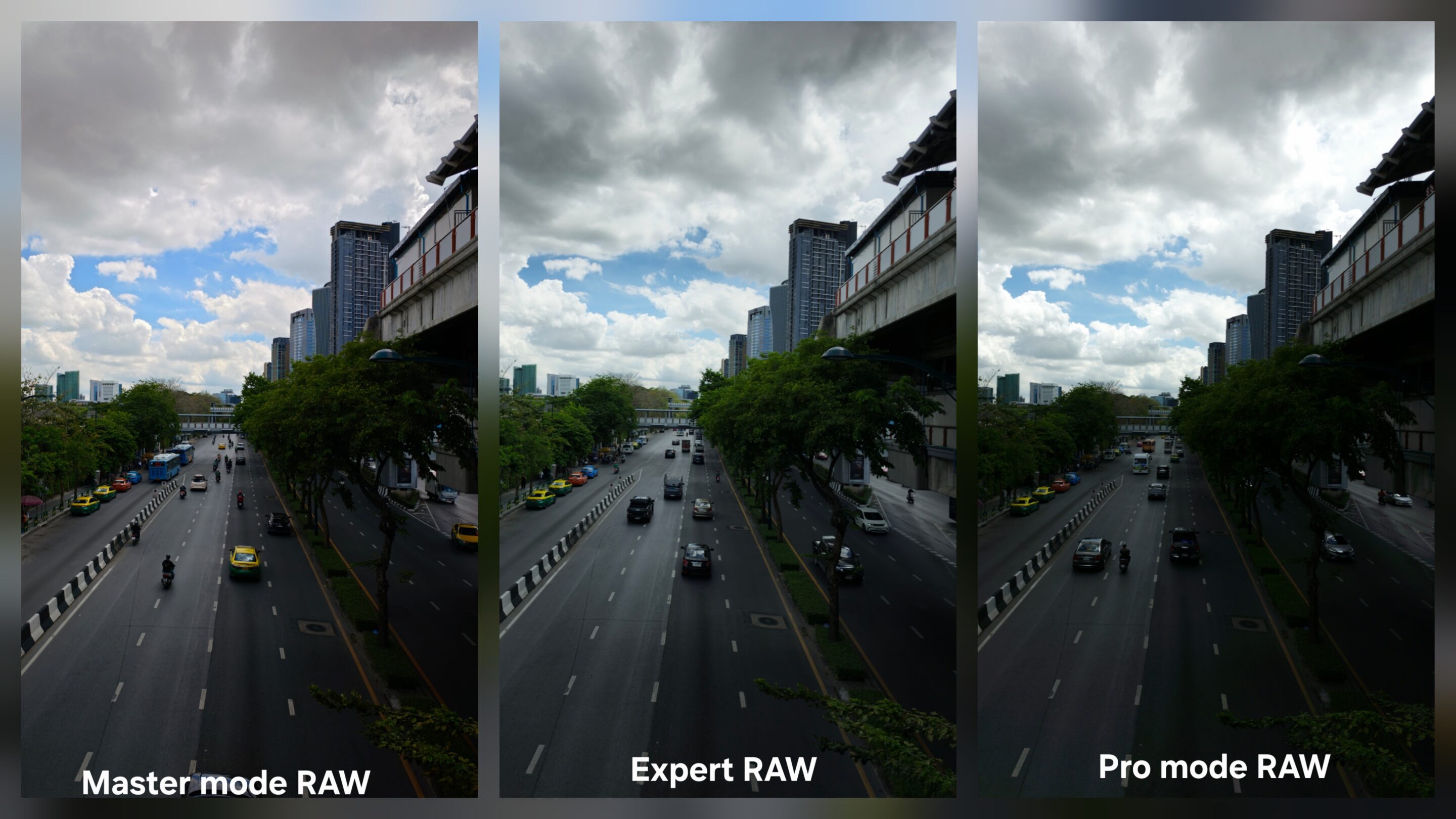
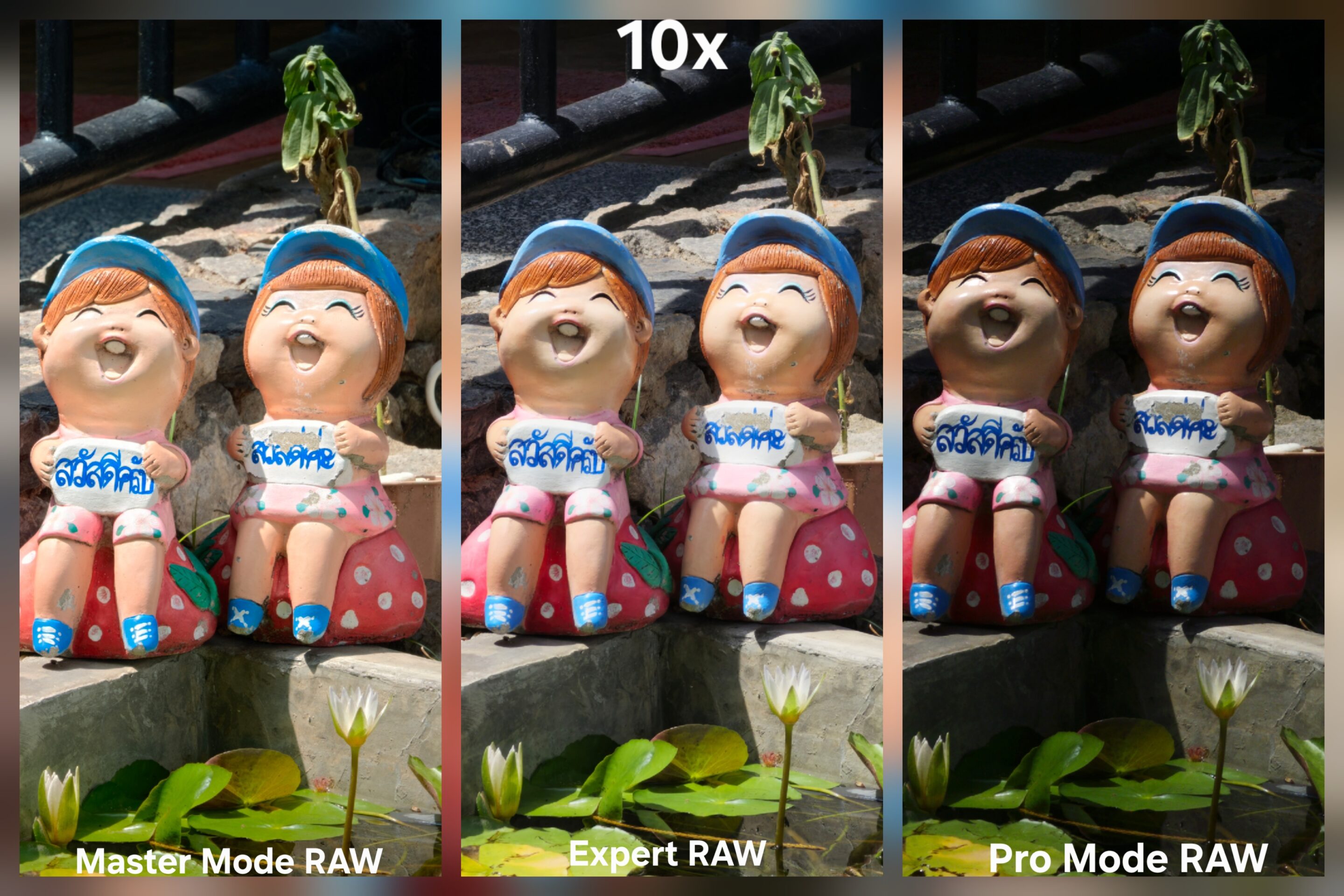
Pro Mode provides traditional RAW capture directly inside the stock camera application. This remains one of the few mainstream flagship implementations that gives photographers direct access to Standard RAW capture without relying on third-party software.
Samsung then separates Expert RAW into its own workflow. Rather than simply duplicating Pro Mode, Expert RAW introduces computational photography techniques while still preserving the flexibility photographers expect from editable image files. It fundamentally changes how photographers interact with the camera. Some users want the cleanest possible file with minimal intervention. Others want computational assistance while still retaining substantial editing flexibility.
Samsung allows both workflows to exist side by side instead of forcing photographers into a single interpretation of RAW. And that flexibility becomes one of Samsung’s biggest advantages.
Resolution and Capture Flexibility
Samsung’s RAW implementation also provides significantly more flexibility in how files are captured and stored. Both Pro Mode and Expert RAW can generate RAW and JPEG files from a single shutter press. In real-world photography, this becomes surprisingly useful because photographers immediately have both an editable file and a ready-to-share image without needing to capture the same scene twice.
Resolution flexibility further expands that advantage. Depending on the lens being used, Pro Mode supports RAW capture at 12MP and 50MP resolutions. Expert RAW expands those options even further, allowing photographers to choose between 12MP, 24MP, 50MP, and 200MP output where supported.
OPPO takes a simpler approach through Master Mode. The workflow remains straightforward, but photographers must choose between RAW and JPEG output rather than receiving both simultaneously. Higher-resolution options are available, but the overall system offers fewer choices for users who frequently move between editing and direct sharing.
Manual Controls and Professional Tools
Both devices provide the core controls photographers expect from a modern manual shooting experience. ISO adjustment, shutter speed control, manual focus, white balance control, and exposure compensation are available across both platforms.
The difference appears when moving beyond the basics. Samsung expands its toolkit further in both Pro mode and Expert RAW. Metering options, including spot, center-weighted, and matrix metering, allow photographers to influence how exposure decisions are made before capture. Additional tools such as Zebra overlays, False Color monitoring, and separate AE/AF controls provide greater visibility into what the camera is actually seeing.
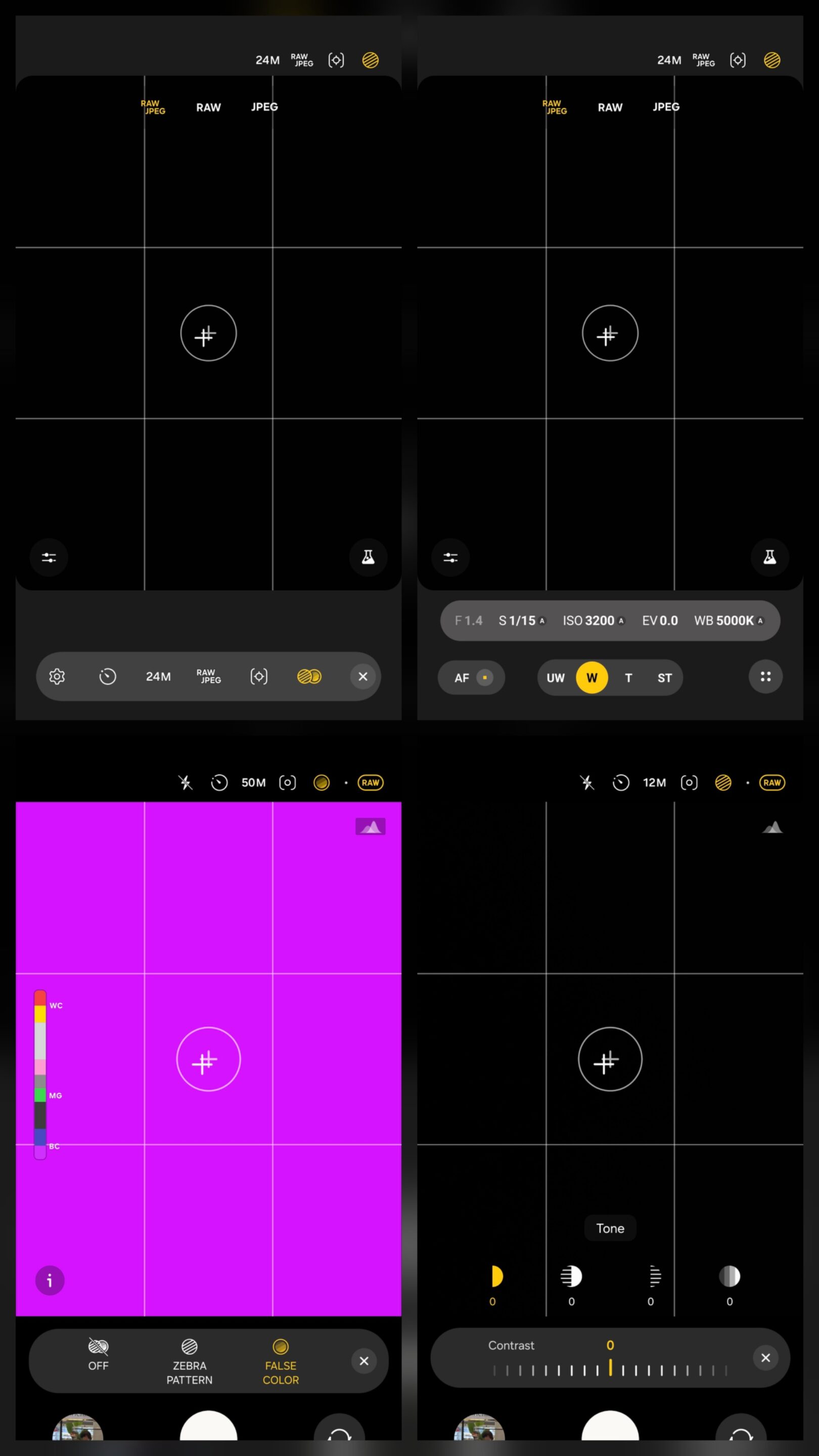
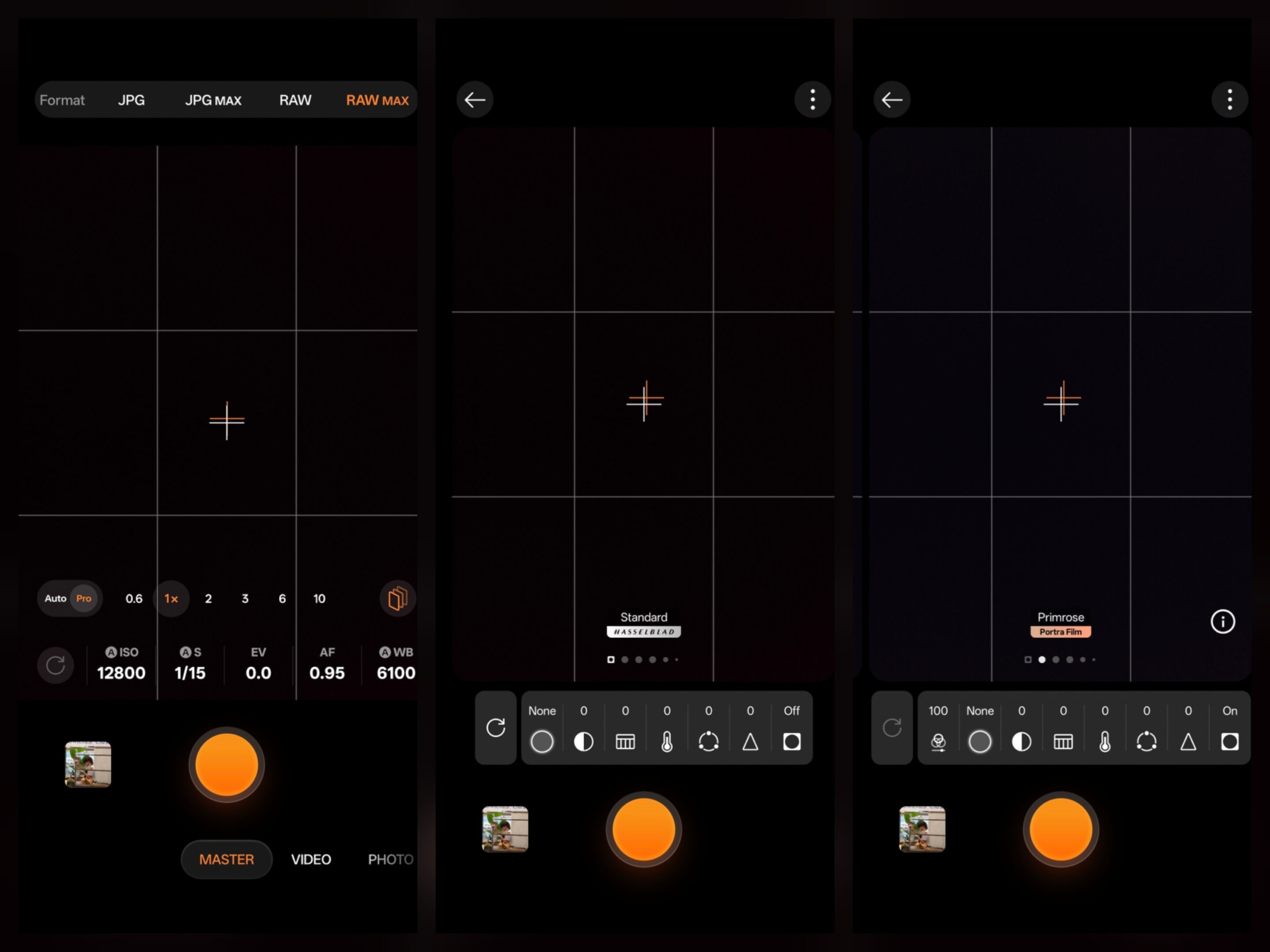
OPPO includes useful features of its own, including face-based metering and creative filters integrated into its shooting experience. But from a pure photography perspective, Samsung currently provides the deeper toolbox.
Natural Rendering, Recovering Detail, and Editing Flexibility
Another area where Samsung surprised me is rendering. Even before editing begins, RAW files from Pro Mode often appear more natural and less processed. The images may not immediately look as dramatic as OPPO’s output, but they provide a cleaner foundation for photographers who prefer building the final look themselves during editing.
In the Auto mode comparison, OPPO’s superior optics frequently translated into visible advantages, particularly throughout the telephoto range. Hardware mattered because the final image depended heavily on what the camera produced before editing.
RAW changes that equation. Once files enter Lightroom or another professional editing workflow, Samsung’s images consistently demonstrate impressive recovery flexibility. Highlight recovery behaves naturally, shadow lifting remains predictable, and color adjustments generally retain their integrity even during heavier edits.
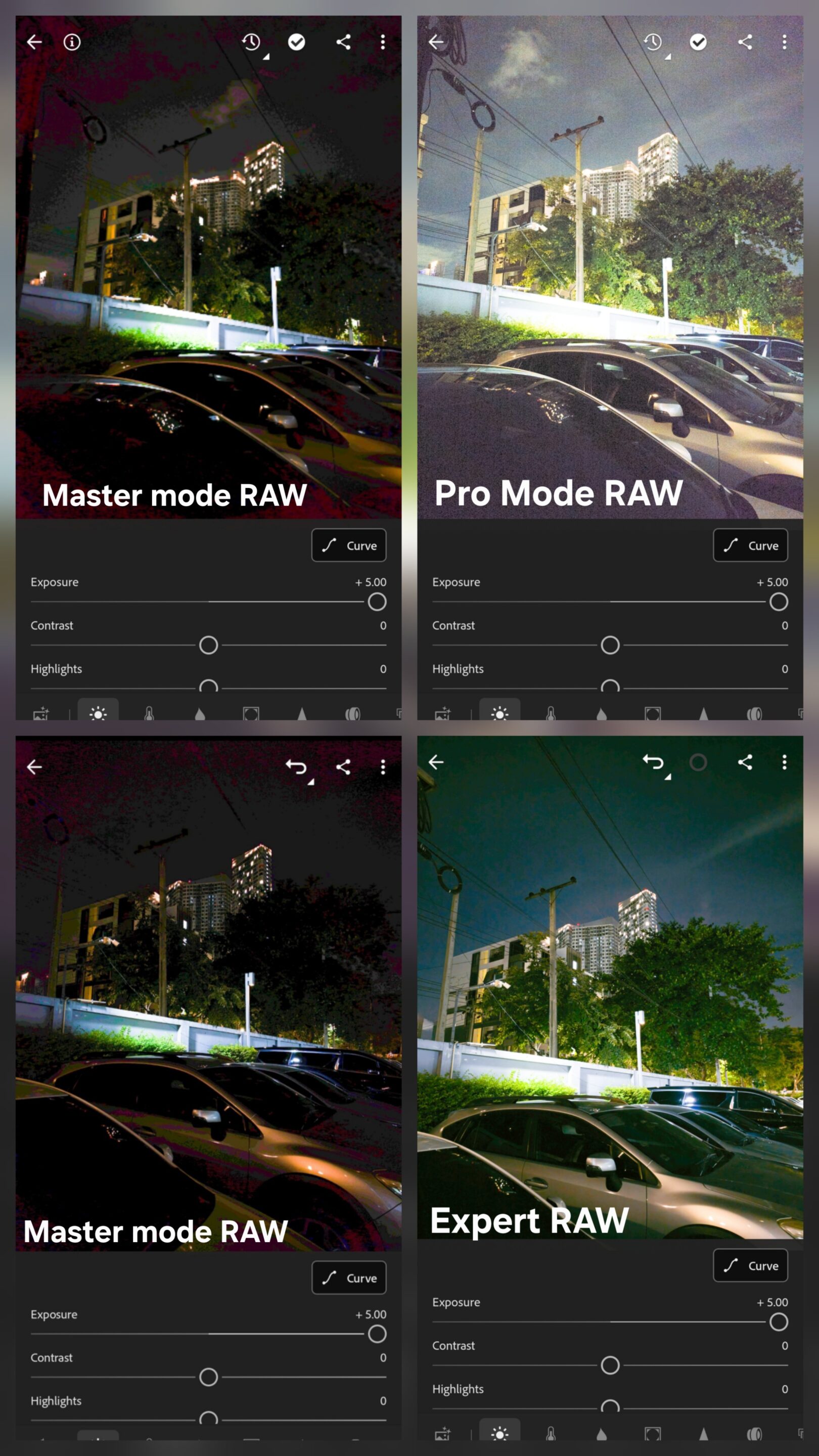
This is where Samsung deserves significant credit. Despite carrying less ambitious hardware in several areas, the Galaxy S26 Ultra repeatedly closes a gap that should theoretically be much larger when viewed purely through specifications. In many situations, the gap becomes surprisingly small once both files enter a proper editing workflow.
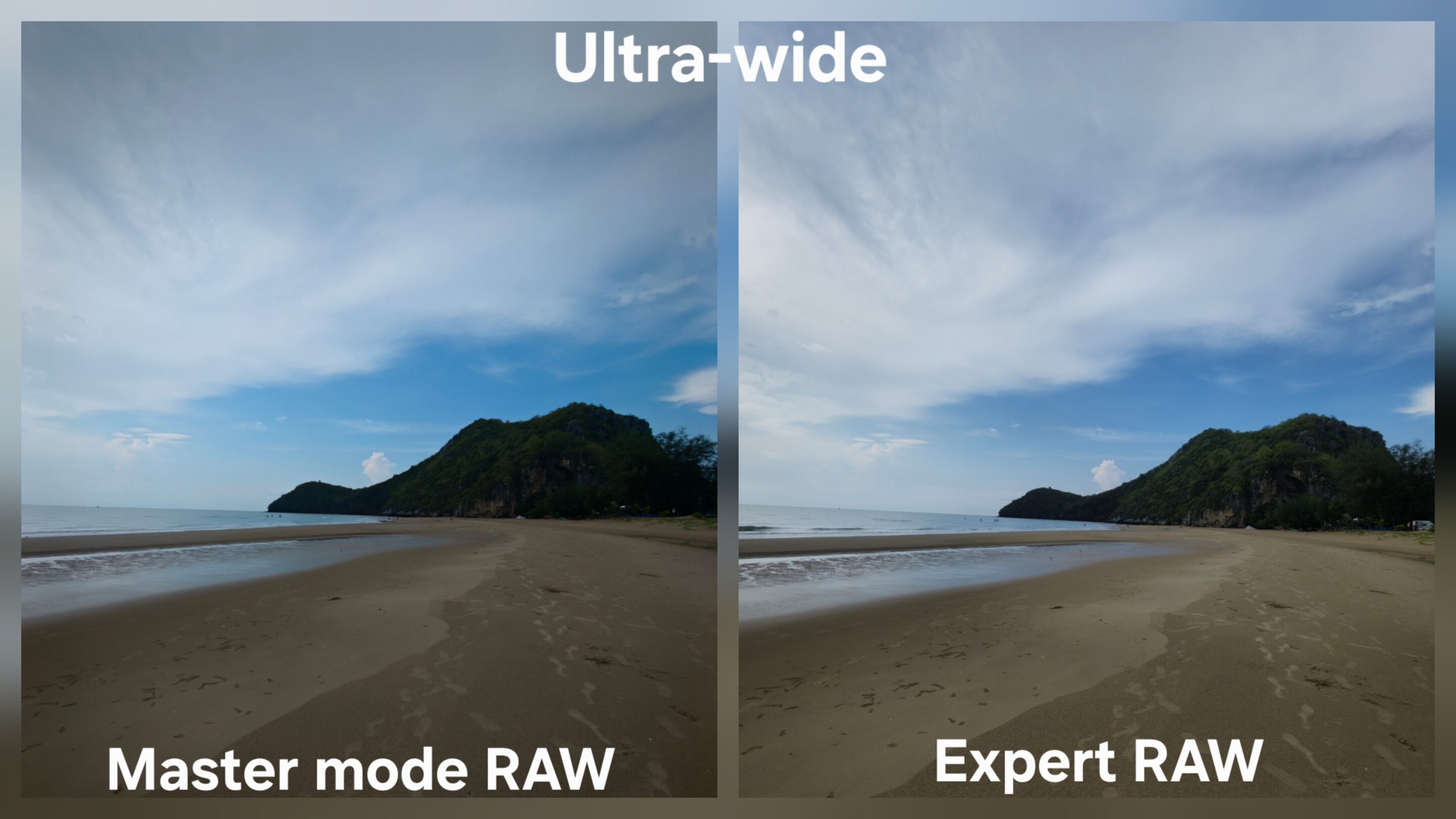
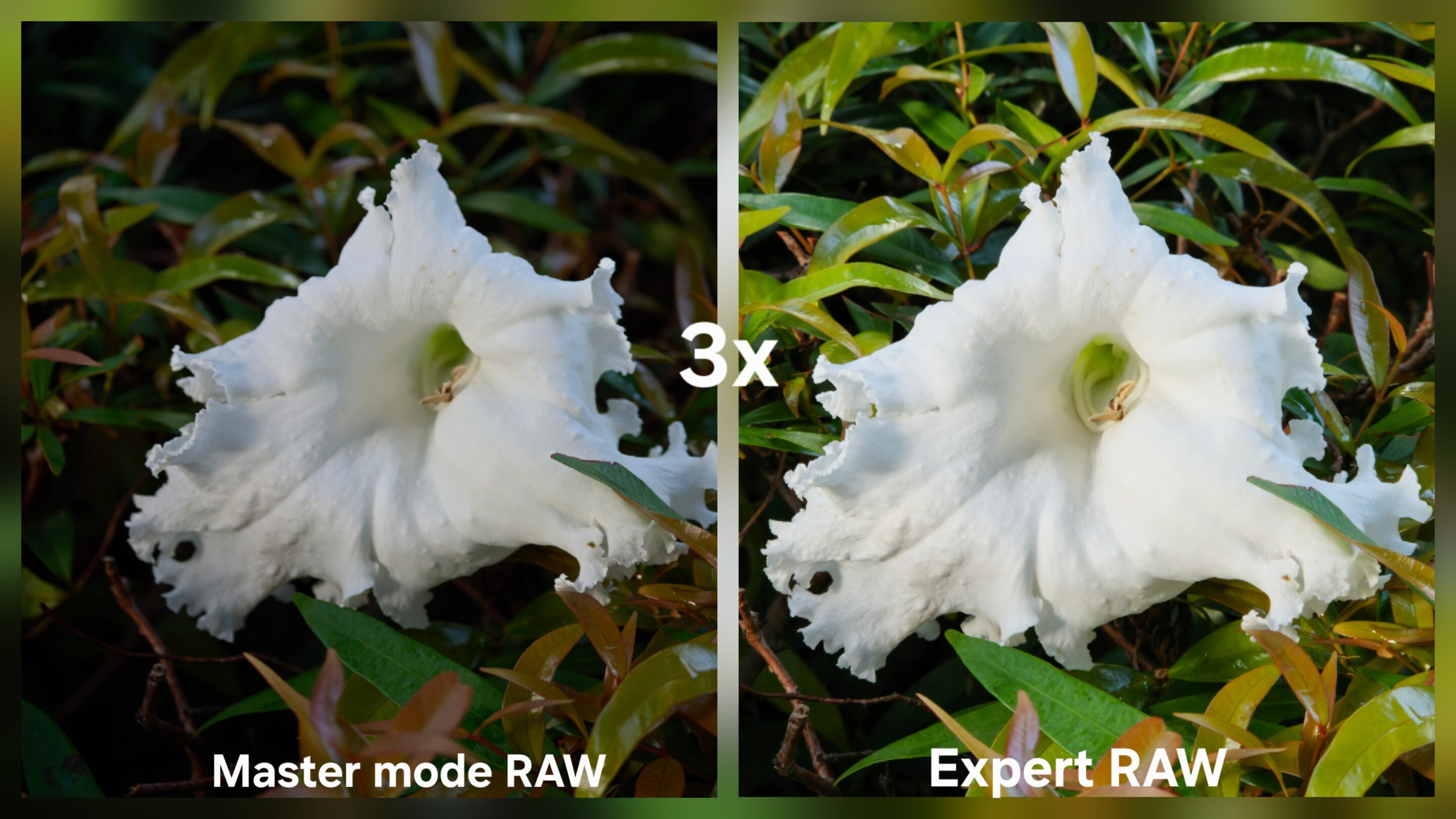
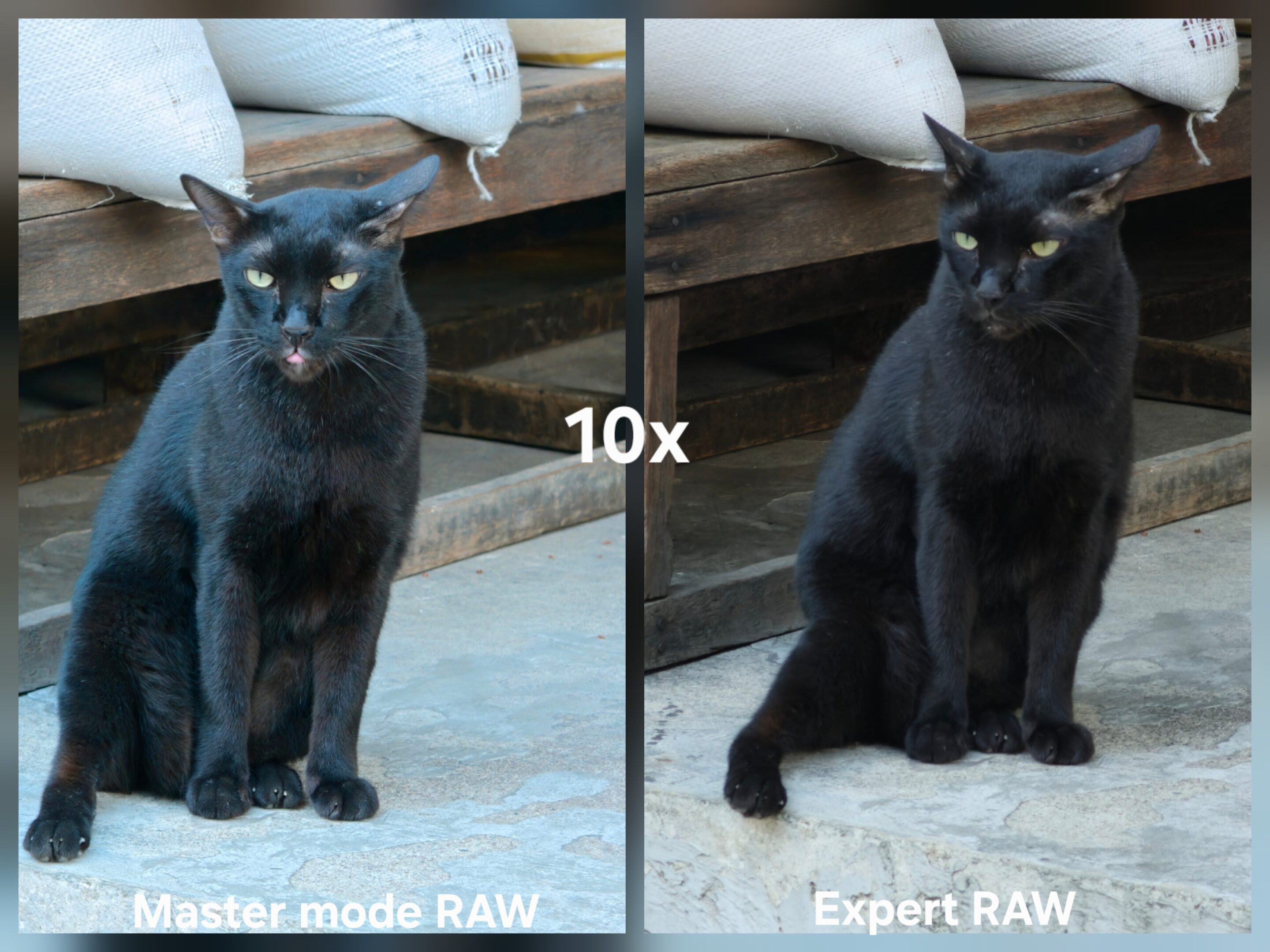
And that reveals something important. RAW photography rewards information preservation more than initial visual impact.
Different Processing Philosophies
Perhaps the most interesting difference between these devices is not image quality itself. It is philosophy. Samsung gives photographers multiple levels of intervention. Users can choose a traditional RAW workflow through Pro Mode, a computational RAW workflow through Expert RAW, or more specialized computational shooting modes such as Virtual Reflector. The photographer decides how much processing enters the image pipeline.
OPPO approaches RAW differently. Master Mode generally produces files with a more unified processing philosophy. Interestingly, OPPO’s Master Mode RAW often behaves closer to Samsung’s specialized Expert RAW modes, such as Virtual Reflector, than to Samsung’s standard Expert RAW or traditional Pro Mode RAW workflows. Both prioritize a cleaner, more presentation-ready image with greater computational influence before editing begins.
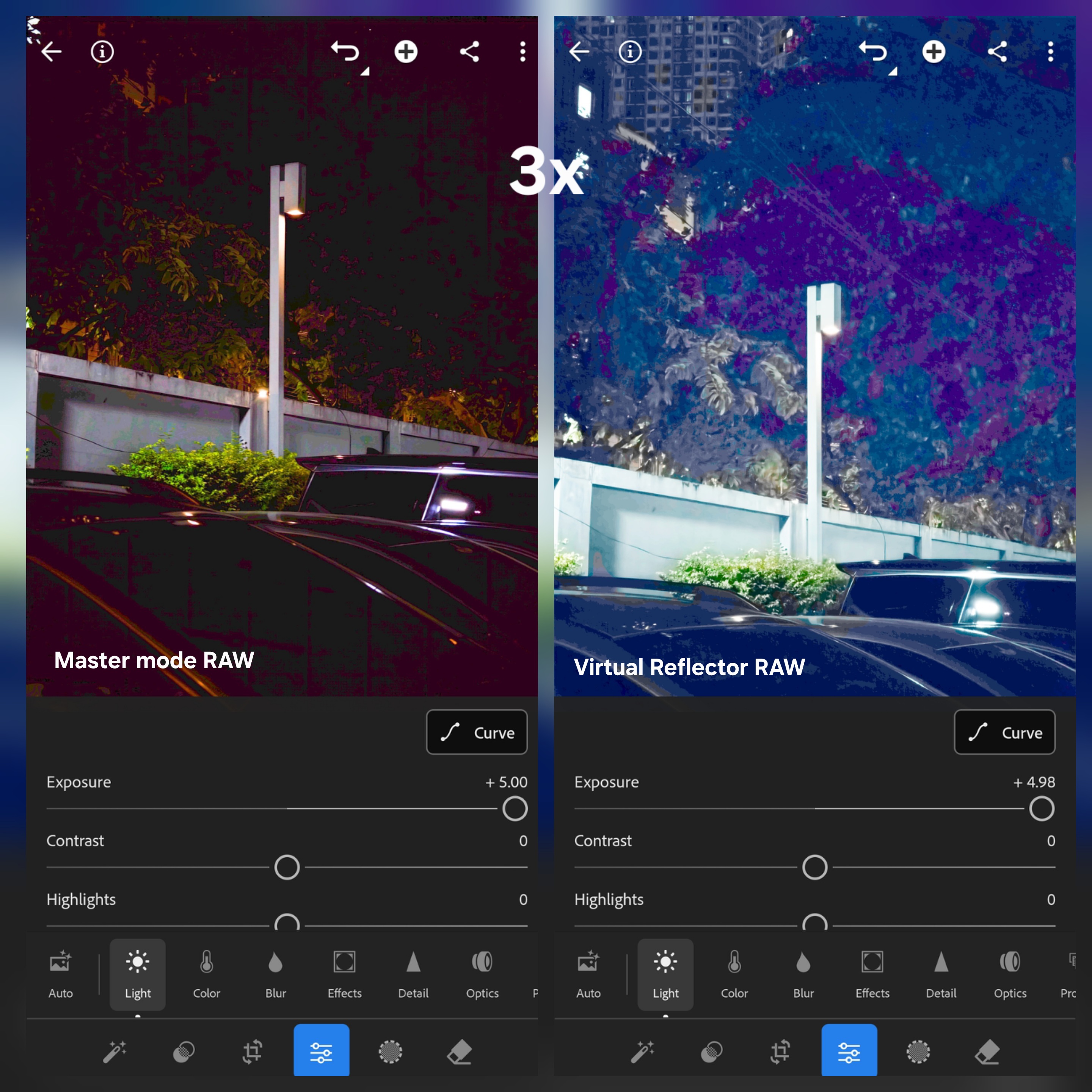
The results can look excellent, and many photographers may genuinely prefer the output. But the workflow offers fewer choices regarding how much computational influence exists before editing begins. This is not inherently a weakness. In fact, some users may appreciate the simplicity. But flexibility has always been one of the defining advantages of RAW photography, and Samsung currently provides more of it.
Between Pro Mode, Expert RAW, simultaneous RAW and JPEG capture, broader resolution options, deeper exposure tools, stronger editing flexibility, and multiple RAW philosophies, the Galaxy S26 Ultra gives photographers more control over how they want to create their images. And ultimately, that is what RAW photography was designed to provide. Not automation. Not convenience but Choice.
For RAW photography, the category goes to Samsung.
Current Comparison Standing
This comparison series is designed around long-term flagship ownership rather than isolated benchmark wins or specification advantages alone. Each category focuses on what genuinely changes the daily experience of using these devices, including camera behavior, endurance consistency, charging flexibility, usability, and system refinement.
After evaluating telemacro capability, zoom performance, design choices, camera usability, pre-order experience, unboxing, battery architecture, standby efficiency, charging experience, Auto mode photography, and now RAW photography, Samsung closes the gap even further. The updated scores are as follows: Samsung — 9; OPPO — 11.
The race is becoming increasingly competitive. But the comparison is still far from finished. Upcoming categories, including special shooting modes, video performance, portrait photography, display quality, One UI ecosystem advantages, audio performance, and long-term software refinement, may still reshape the outcome significantly.
Stay tuned.

Follow us on Google Discover & set us as a preferred source in Google News
Share this Post
___________________________


New Blog Posts
___________________________

Samsung Brings New Health Features to Galaxy Watch
The company will first introduce the features on its upcoming Galaxy Watch models

June 2026 Google Play System Update: What’s New?
The update brings improvements to Android’s core services
Samsung and MediaTek Hit New 5G Uplink Speeds in Joint Test
Samsung and MediaTek push 5G uplink speeds to 670 Mbps in new test


