Google Chrome’s New AI Feature Can Replace Images on Websites

SammyGuru is reader-supported. We have affiliate and sponsored partnerships, so we may earn a commission when you buy through links on our site — at no extra cost to you. Learn more.
Google Chrome is testing an AI-powered feature called ‘Indigo’ that can replace images on web pages directly in the browser. The feature places AI-generated image versions over the originals without changing the website itself. It may take a while for the new tool to roll out publicly.
How Indigo works in Google Chrome
The Indigo chip appears in Chrome’s address bar on web pages where the browser detects images it can work with. Clicking the chip opens a small panel labeled “Generated by Google” near the image. The panel appears collapsed by default. You can click the down arrow to expand it and view the available options, and close it using the close button.
The panel includes options to:
- Regenerate the image
- Replace the original image
- Delete the original image
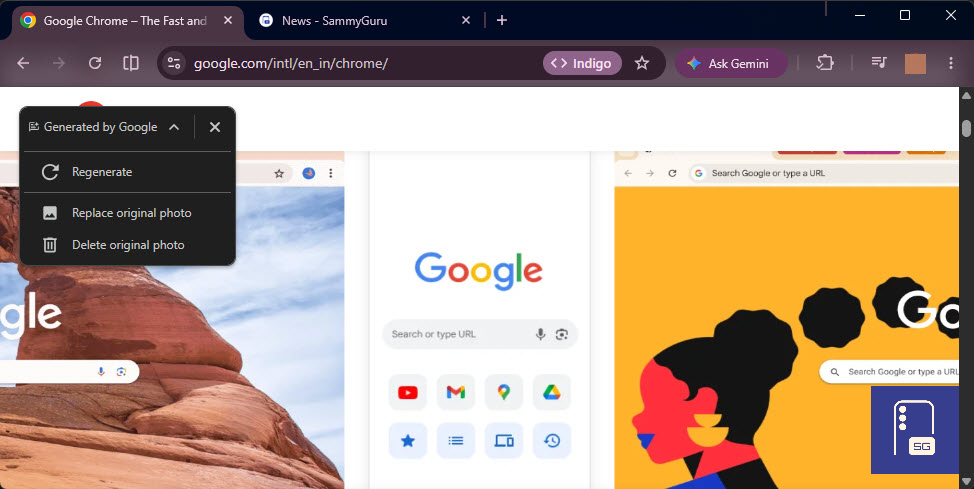
For now, the buttons appear but don’t function yet. Chrome’s internal Indigo status page shows the AI generation component remains disabled, even when the interface is visible. This basically means the feature is still in development, and access is limited.
But when available and activated, Chrome sends the selected image to Google’s servers, which return an AI-generated version. The new image is placed directly over the original within the same webpage. Any changes apply only to what you see in Chrome. The original image on the website remains unchanged, and refreshing the page restores it.
Google has not announced Indigo publicly. Based on code visible in Chromium’s source, the interface is in place, but the AI generation system remains restricted. Google is still working on this feature, and more details could emerge as it moves closer to release. We will keep you posted.

Written by
Jeff SpringerJeff Springer is the Founder and Managing Editor at SammyGuru. Pursuing his passion for mobile tech, he started covering Samsung and Android on his Youtube channel in 2014 and continues to post daily Samsung tutorial videos. As a past staff writer at XDA Developers and Android Police, Jeff has a wealth of experience managing written content as well. In 2023, Jeff started SammyGuru to offer a different type of Samsung news site. He firmly believes that providing great value to readers is the core mission of our coverage. Jeff lives in Phoenix, AZ with his wife and two kids. In his small amount of free time, he collects fountain pens, stationery, and Pokémon cards.

Follow us on Google Discover & set us as a preferred source in Google News
Share this Post
___________________________


New Blog Posts
___________________________
Samsung is Reportedly Seeking Millions From Triller Over an Unpaid App Deal
That’s going to leave a mark…
Galaxy Buds 4 Pro’s Best Deal in the US Hasn’t Gone Away
Galaxy Buds 4 Pro’s best deal brings back $169.99 price
Samsung Galaxy Weekly Updates Roundup (June 15-21)
Samsung released the June 2026 update for 30+ devices this week