Chrome Tests Gemini Autofill to Recall Personal Info in Text Fields

SammyGuru is reader-supported. We have affiliate and sponsored partnerships, so we may earn a commission when you buy through links on our site — at no extra cost to you. Learn more.
Chrome is testing a new Autofill experience that claims to bring Gemini into text fields. A popup says Gemini can pull in personal information from across Google apps and fill it into pages. There’s also a built-in search interface, so you can quickly find and insert saved details on demand. Google internally calls this the “Autofill @memory” project.
Chrome Canary adds @@ shortcut for new Gemini Autofill experience
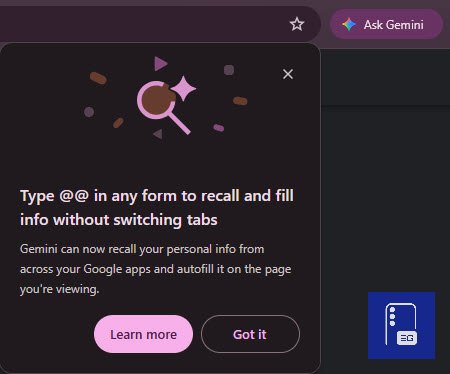
Internally, Google refers to this as the “Autofill @memory project,” and it shows up in Chrome Canary (version 149). Chrome displays an on-screen message that reads:
Type @@ in any form to recall and fill info without switching tabs.
Gemini can now recall your personal info from across your Google apps and autofill it on the page you’re viewing.
This message links the feature to Gemini and describes a system that can recall personal information across Google apps and insert it into text fields.
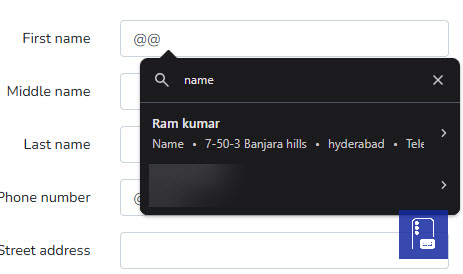
In our tests, typing @@ in a text field opens a compact popup anchored to the field and activates a search bar. You can type keywords like “name,” “city,” or “phone” to pull up matching entries.
Chrome shows suggestions from saved Autofill data, including names, addresses, and contact details. You can insert them directly into the field.
Generally, Chrome Autofill relies on field detection and automatic suggestions when it recognizes a form field type and matches it with stored data in a user’s Google account or local profiles.
This test changes how Autofill works. You can type @@ to open a search interface in a text field and retrieve specific information. It works even in fields where Autofill doesn’t trigger or where multiple entries exist. This gives you more control over what gets inserted instead of relying only on automatic suggestions.
So, what does Gemini add to Autofill @memory?
The popup includes Gemini messaging that says personal information can be recalled “from across your Google apps” and autofilled on the page. In testing, results come mainly from standard Autofill address and contact data. There is no consistent evidence that data from other Google apps is retrieved.
This shows the Gemini-linked memory system is still under development and not fully connected to all data sources. The feature is also in development for Android. Recent Chromium changes add a bottom sheet interface designed to recall and insert saved information on mobile.
Chrome already stores personal data for Autofill, including addresses, phone numbers, and contact details. This experiment adds a searchable layer inside text fields that users can trigger with @@. Right now, it works as a searchable view of existing Autofill data. The Gemini messaging describes a system that could go beyond locally saved profiles.
The feature is still in testing in Chrome Canary. The Gemini and data connections perhaps aren’t finalized. As such, there is no confirmed timeline for rollout. We hope to hear something from Google in the coming days or weeks.

Written by
Abhinav AnandAbhinav Anand is the News Editor at SammyGuru and a technology journalist based in New Delhi. Before joining SammyGuru, he contributed to numerous outlets, including Android Headlines, ExtremeTech, The Mac Observer, Financial Express, Economic Times, iGeeksBlog, KnowTechie, PhonesWiki, SlashGear, and more. You can reach him at [email protected].

Follow us on Google Discover & set us as a preferred source in Google News
Share this Post
___________________________


New Blog Posts
___________________________
Galaxy Buds 4 Pro’s Best Deal in the US Hasn’t Gone Away
Galaxy Buds 4 Pro’s best deal brings back $169.99 price
Samsung Galaxy Weekly Updates Roundup (June 15-21)
Samsung released the June 2026 update for 30+ devices this week
Galaxy Watch 9 and Watch Ultra 2 Leak With New Watch Faces
Exciting new info on Samsung’s upcoming wearables!