Gemini in Google Sheets Now Supports 28 Additional Languages
SammyGuru is reader-supported. We have affiliate and sponsored partnerships, so we may earn a commission when you buy through links on our site — at no extra cost to you. Learn more.
Google is making Gemini in Sheets easier to use for people around the world. The company has announced that Gemini features in Sheets now support many more languages, which should make them more useful for everyday work.
This update makes Gemini in Sheets more useful globally
Earlier this year, Google added several Gemini features to Sheets, including the ability to create full spreadsheets with a simple prompt. However, those tools were limited to English and were mostly available in the US. That made them less practical for users in other regions who prefer working in their own language.
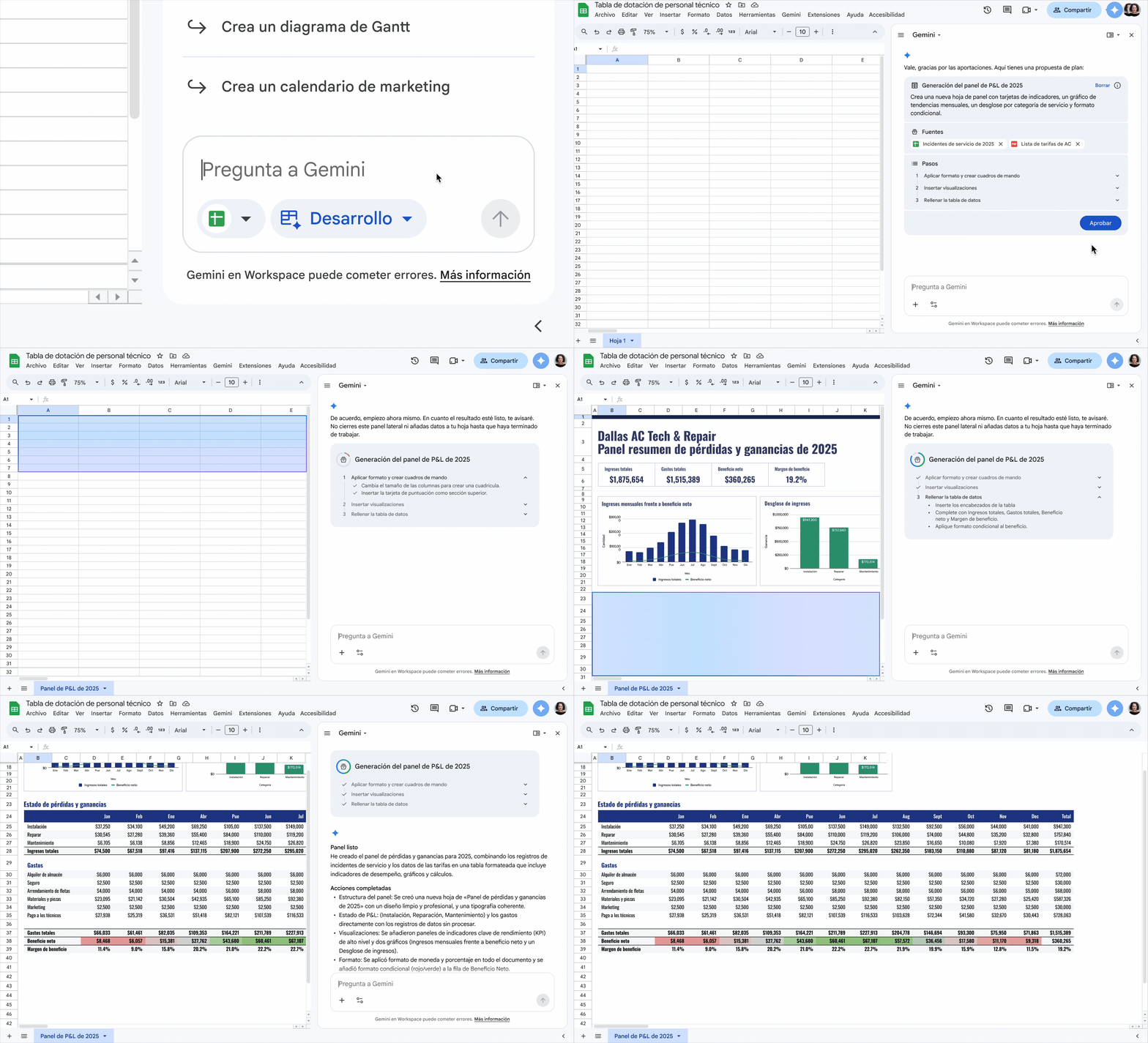
That’s now changing, as Google is adding support for 28 new languages. Users can now ask Gemini to create or edit spreadsheets in their preferred language, which should make things smoother for individuals as well as teams working across different countries. Here’s a quick list of all the languages that Google is adding support for:
- Spanish
- Portuguese
- Japanese
- Korean
- Italian
- French
- German
- Simplified Chinese
- Dutch
- Hebrew
- Polish
- Turkish
- Czech
- Indonesian
- Malay
- Swedish
- Danish
- Norwegian
- Arabic
- Finnish
- Vietnamese
- Ukrainian
- Greek
- Thai
- Romanian
- Russian
- Catalan
- Hungarian
The update also makes collaboration smoother for multilingual teams. Users can work on the same spreadsheet using different languages without running into major issues. This should help reduce friction in global workflows where language differences can slow things down.
In other words, it can help create tables, build pivot views, and apply complex formulas without requiring much prior knowledge. With broader language support now available, more users can take advantage of these features in their daily work.
To try these features, users need access to Gemini for Workspace in Sheets. It is available on select plans, including Business Standard and Plus, Enterprise Standard and Plus, as well as Google AI Pro, Ultra, and certain education add-ons. Workspace smart features must also be enabled.

Written by
Abhinav AnandAbhinav Anand is the News Editor at SammyGuru and a technology journalist based in New Delhi. Before joining SammyGuru, he contributed to numerous outlets, including Android Headlines, ExtremeTech, The Mac Observer, Financial Express, Economic Times, iGeeksBlog, KnowTechie, PhonesWiki, SlashGear, and more. You can reach him at [email protected].

Follow us on Google Discover & set us as a preferred source in Google News
Share this Post
___________________________


New Blog Posts
___________________________
Google’s AI Overviews May Be Sending Users Straight to Rivals
Google AI suggests DuckDuckGo as a way to avoid AI-heavy search

Samsung is Testing Android 17-Based One UI 9 for These Galaxy Devices
More devices should appear with test builds soon

Galaxy S26 Ultra Gets $200 Off in the US, Bundle Deal Sweetens the Offer
Galaxy S26 Ultra + Galaxy Buds 4 Pro bundle is a much better deal