
Find Hub Now Lets You Set Location Sharing Alerts

SammyGuru is reader-supported. We have affiliate and sponsored partnerships, so we may earn a commission when you buy through links on our site — at no extra cost to you. Learn more.
Google has pushed a new update to its Find Hub app with version 3.1.608-5. The update brings a location sharing notifications feature that alerts you when friends or family members arrive at or leave a place. You can download the latest version right away through the Play Store to access the new capability.
Google introduces the arrival and departure alerts system in Find Hub
Once you update your Find Hub app, you will see a new message that says, “Add a location notification: Get notified when someone arrives or leaves a location, like home or work.” The feature shows up within the People tab after selecting a contact who shares their live location with you. From there, you can create a notification for arrivals, departures, or both.
For example, parents can receive a notification when a child arrives at school. Likewise, the app can also send alerts when someone leaves a particular location. The best thing is that you can adjust the size of the area on the map for accurate alerts. Moreover, you can turn it off at any time through the settings.
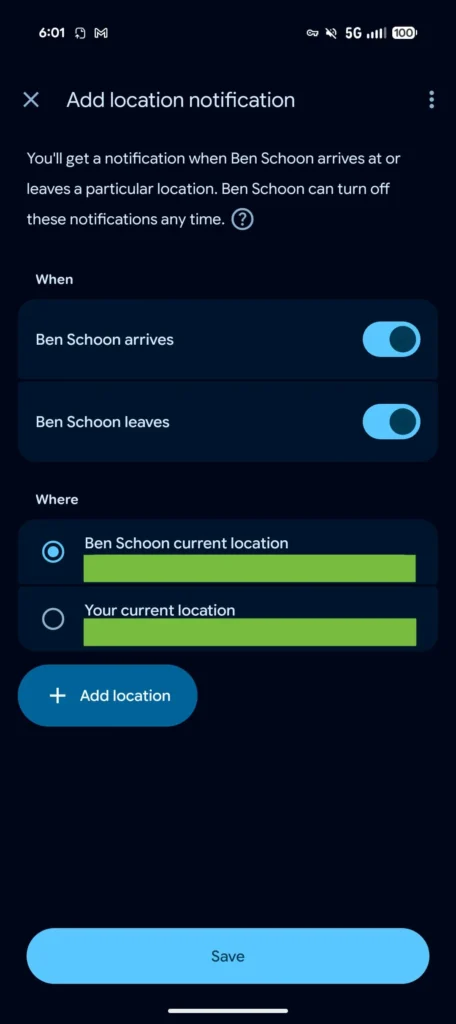
To enable location sharing notifications, you need to first open the Find Hub app. Now, head over to the People tab and select the profile of the person (who shares their live location with you). After that, tap Get location notifications> Add a location notification.
Look for the When section, where you can choose from two notification options. These include alerts for when the person arrives at a location and when the person leaves a location. You can also turn on both options at the same time.
Now go to the Where section and pick an address. You can also tap on “Add location” to create a new one. Enter the address or choose one from the smart suggestions. Finally, tap Save and OK to start the notification.

Written by
Binay KonwarBinay Konwar started his blogging journey in 2014 and has since written plenty of tech articles. At present, he is working as a News Writer at SammyGuru, covering everything about Samsung. He holds a Master's degree in Mathematics, but his real passion lies in tech and writing. In his free time, he enjoys playing chess and watching movies.

Follow us on Google Discover & set us as a preferred source in Google News
Share this Post
___________________________


New Blog Posts
___________________________

Samsung Quietly Listed a New Entry Level 990 PCIe 4.0 SSD
It drops DRAM for HMB

Samsung’s First Bone-Conduction Earbuds May Be Called Galaxy Able
Name hidden no more

Samsung Accidentally Confirms Galaxy Watch 9 and Galaxy Watch Ultra 2
Coming very soon







