Gemini Throws Error 1099, but There Are a Few Workarounds

SammyGuru is reader-supported. We have affiliate and sponsored partnerships, so we may earn a commission when you buy through links on our site — at no extra cost to you. Learn more.
Are you seeing Error 1099 every time you try to use Gemini with “Hey Google” or the power button? Well, you’re not alone. Several Android users have reported the same issue over the past few days. The good news is that there are a few workarounds that may help get the AI assistant working again.
Several Gemini users report Error 1099 on Android
Google lets you wake up Gemini using voice commands like “Hey Google” or by long-pressing the power button. However, it looks like these methods are experiencing an issue that prevents some users from starting a conversation with the AI. Once they try to interact with Gemini after launching the Assistant interface, a message pops up that reads, “Something went wrong, please try again (1099).” The error appears whether they use voice input or type their prompt.
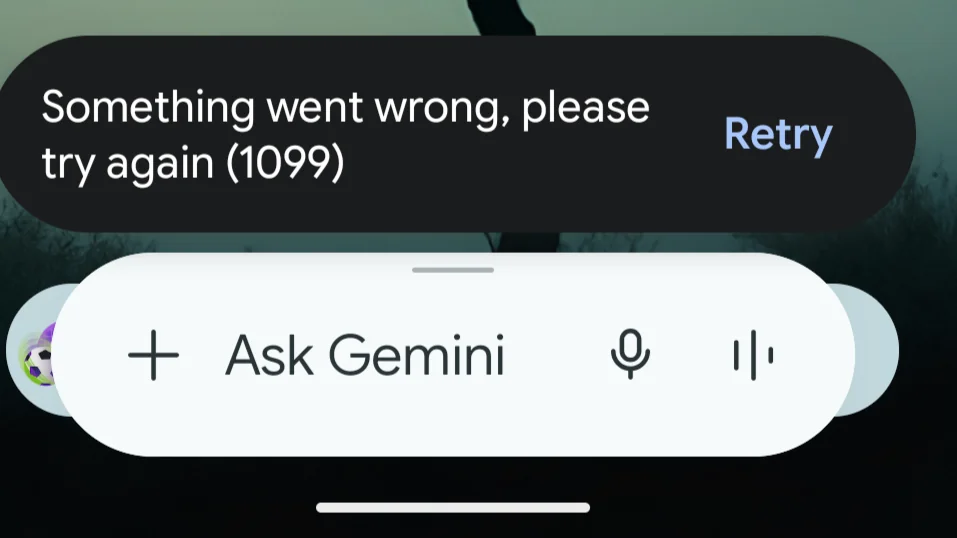
Interestingly, the issue only affects the Gemini Assistant interface. When affected users open their Gemini app manually and start a new chat, everything works smoothly. Some believe that the issue is tied to the Google account rather than a specific device. A user saw the error on both a Pixel 10 Pro and a Galaxy Tab S10 using the same account.
A Platinum Product Expert in the Google Support Community has described Error 1099 as a backend-specific issue. This suggests the problem is likely related to Google’s servers. While the company works on a fix, you can try a few workarounds to get rid of the error.
These include switching between Gemini and Google Assistant. To do this, open the Google app and go to Settings. Now select Gemini and then tap Digital assistants from Google. From there, you can select Google Assistant. Make sure to restart the device before switching back to Gemini.
Another way is to update Google Play Services to the latest version. After updating, uninstall both the Google and Gemini apps. Now reinstall them from the Play Store. These steps should resolve Error 1099.

Written by
Binay KonwarBinay Konwar started his blogging journey in 2014 and has since written plenty of tech articles. At present, he is working as a News Writer at SammyGuru, covering everything about Samsung. He holds a Master's degree in Mathematics, but his real passion lies in tech and writing. In his free time, he enjoys playing chess and watching movies.

Follow us on Google Discover & set us as a preferred source in Google News
Share this Post
___________________________


New Blog Posts
___________________________

Galaxy A57 Spotted Running One UI 9 on Geekbench
It was launched running One UI 8.5

Galaxy Z Fold 8, Fold 8 Ultra, Flip 8 and Watch 9 European Prices Leak
Prepare to pay more for new Samsung products
Samsung Trademarks Hint at New Motion Clarity Feature for Odyssey Monitors
Samsung may be preparing to introduce a new display technology