Google Messages Brings Back Seamless SIM Switching

SammyGuru is reader-supported. We have affiliate and sponsored partnerships, so we may earn a commission when you buy through links on our site — at no extra cost to you. Learn more.
Google Messages brings back seamless switching between SIM cards while sending texts. The company previously disrupted this convenience during a UI redesign, slowing the process for dual-SIM users. As of now, only beta users can access the improved SIM switching experience.
Switching SIMs now becomes easier in Google Messages
Previously, switching between SIM cards in Google Messages was much more straightforward. A SIM icon right inside the compose box allowed you to switch the preferred SIM instantly. As such, you could pick which number to use for sending text without leaving the chat screen.
However, as part of a UI redesign, Google removed this convenience, forcing users to go through multiple steps. These include opening the contact’s profile details page, tapping the SIM selection option, and selecting the desired SIM card. After doing all of this, you had to come back to the chat screen to type the message.
Thankfully, Google Messages now brings a more intuitive SIM switching experience, according to a report from Piunikaweb. In the latest beta version of the messaging app, you will see a new “Switch SIM” button. This shows up within a menu when you tap inside the message compose field. The option joins the existing quick actions such as “AI Writing” and “Autofill.”
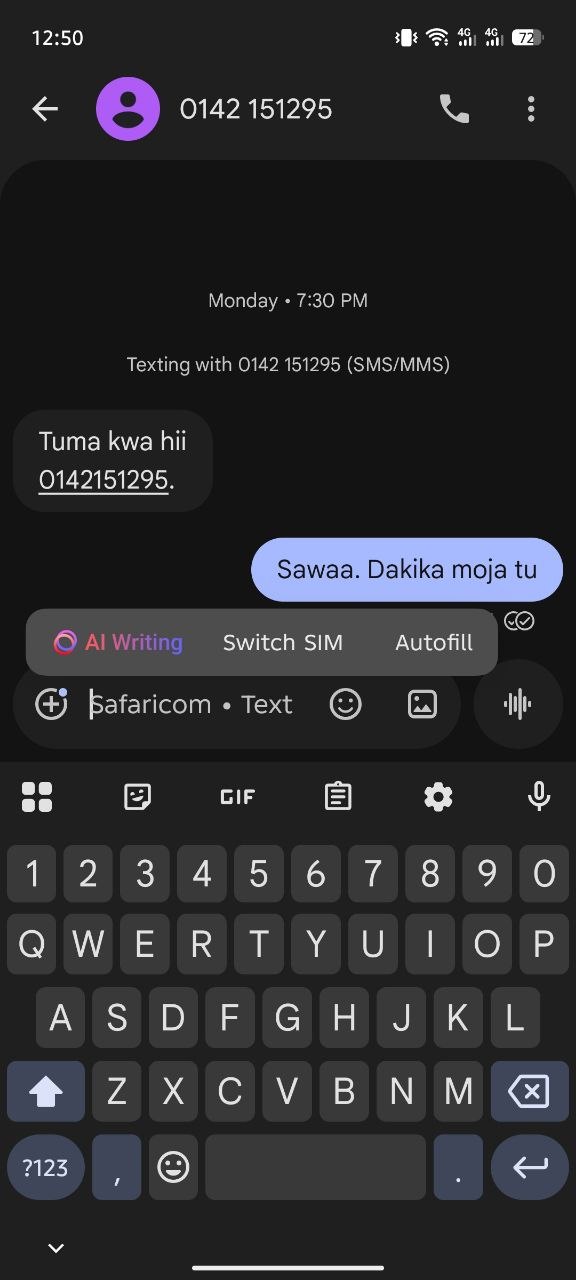
However, there is still one catch: tapping the “Switch SIM” option does not jump between SIM 1 and SIM 2. The button takes you to the SIM selection screen. From there, you can pick a preferred SIM and then return to the chat with a single back press.
While this process is not yet a true one-tap switch, it is a welcome improvement. Moreover, you will now see the carrier’s name within the compose field. Hopefully, this change does not take too long to hit the stable release channel. If you can’t wait, you can become a beta tester from here.

Written by
Binay KonwarBinay Konwar started his blogging journey in 2014 and has since written plenty of tech articles. At present, he is working as a News Writer at SammyGuru, covering everything about Samsung. He holds a Master's degree in Mathematics, but his real passion lies in tech and writing. In his free time, he enjoys playing chess and watching movies.

Follow us on Google Discover & set us as a preferred source in Google News
Share this Post
___________________________


New Blog Posts
___________________________

More Galaxy Watch Models Get New Update in the US — Brings an Important Fix
May 2026 update now available for Galaxy Watch 6 and older models

The Pope Uses Samsung: Leo XIV Confirms He Owns a Galaxy Phone and Watch
Pope Leo XIV is a Samsung fan
Gemini in Google Sheets Now Supports 28 Additional Languages
This update makes Gemini in Sheets more useful globally