
Galaxy S26 Series Gets New Inactivity Restart Feature with First Update

Samsung recently started rolling out the first software update for the Galaxy S26 series. While the company’s official changelog highlighted stability improvements and security fixes, the update also introduces a new feature called Inactivity Restart. Other Galaxy devices also received this feature with the February 2026 security patch.
First Galaxy S26 update includes a new security feature
The Galaxy S26, S26+, and S26 Ultra’s first update is already available in several markets, including South Korea, Europe, and India. The firmware update carries the February 2026 security patch, which addresses more than 30 vulnerabilities. It basically focuses on improving system stability and reliability.
However, hidden within the package is Samsung’s new Inactivity Restart feature, designed to help protect sensitive data stored on the device. When enabled (it’s actually enabled by default), the phone will automatically restart itself if it remains locked and unused for 72 hours. After the restart, the device returns to a more secure state that requires the user’s passcode or biometric authentication to fully unlock the phone.
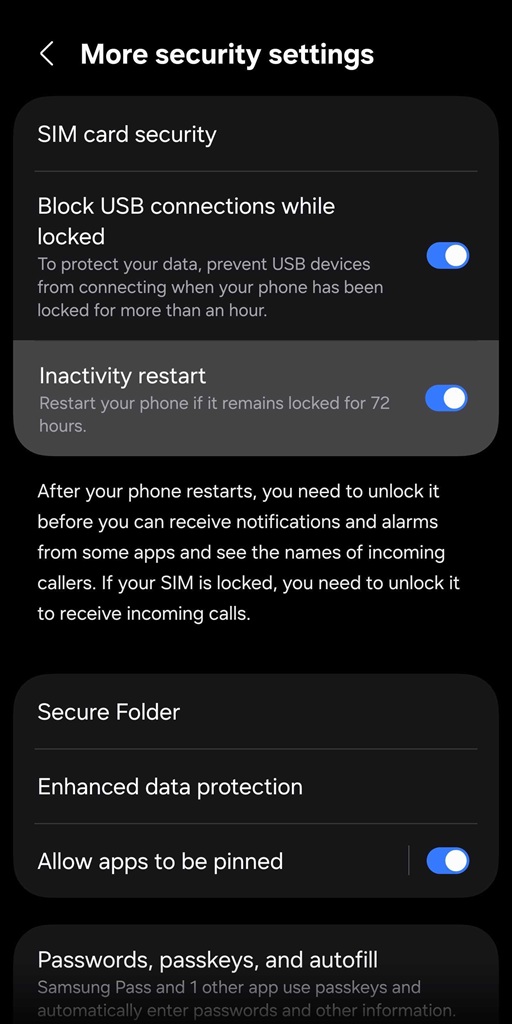
This extra layer of protection can help safeguard personal data if the device is lost or stolen. It ensures that sensitive information remains protected by forcing the device back into its most secure state. Samsung introduced this feature to Galaxy devices with the February 2026 update. The Galaxy S26 lineup is now picking it up with its February update.
The first update for Samsung’s latest flagships carries the firmware build ending in AZC7. Download sizes vary by device model and region, but the package mostly hovers around 500MB. To check for updates, go to Settings > Software update > Download and install. The Galaxy S26 series supports Seamless Updates, so users can continue using their device normally while the update downloads and prepares for installation.
Once everything is ready, the phone simply prompts the user to restart the device, completing the process within seconds. The system eliminates the need to sit through lengthy installation screens, making software updates much less disruptive.

Follow us on Google Discover & set us as a preferred source in Google News
Share this Post
___________________________


New Blog Posts
___________________________
Galaxy S25’s June 2026 Update with AI Features Live in Europe, India
More AI-powered tools arrive on Galaxy S25 phones

Samsung Releases June 2026 Update for Galaxy S26 in More Countries
This update addresses over 40 vulnerabilities across the Galaxy family

Galaxy Z Fold 8 (Wide) May Feature Thicker UTG Than Fold 8 Ultra
Samsung appears to be tuning its foldable UTG strategy


