Telegram Is Back on Galaxy Watch With a Surprisingly Polished App

SammyGuru is reader-supported. We have affiliate and sponsored partnerships, so we may earn a commission when you buy through links on our site — at no extra cost to you. Learn more.
There was a time when Telegram existed on Wear OS. However, in 2021, Telegram abandoned Wear OS, along with Galaxy Watch smartwatches. It was always one of the biggest missing messaging apps on the platform… but now, it’s finally coming back.
Telegram is already here for Galaxy Watch, but with a catch
Right now, the app is only available for Telegram Beta users enrolled through the Google Play Store. However, after seeing it on Galaxy Watch 7 (h/t WigettaGaming), Telegram is taking the experience seriously.
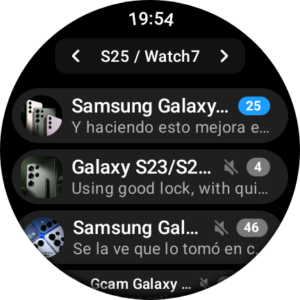
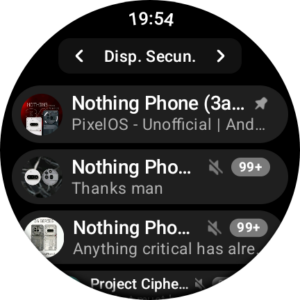
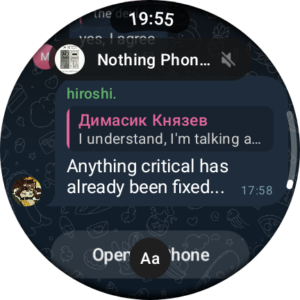
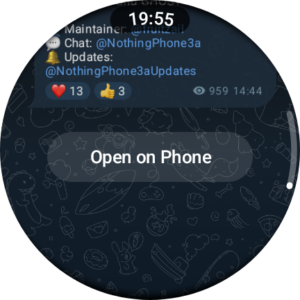
Surprisingly, the app feels very close to the phone version. The first thing that immediately stands out is how familiar the interface feels. Telegram kept the same chat backgrounds from your phone, the same conversation styling, and similar chat bubble layouts. In addition, the visual identity is almost identical.
In many ways, the experience feels similar to how WhatsApp handles its Wear OS app, just more visually aligned with Telegram’s own design language. And personally, I like Telegram’s app more than WhatsApp’s app on Wear OS. The consistency makes the app feel much more complete. It does not feel like a stripped-down smartwatch companion.
Clean and very optimized UI for round screens
At the very top of a chat, Telegram shows the profile picture of the chat or group, the chat or user name, and a live clock indicator. The overall layout feels very close to Telegram on phones. However, it is adapted carefully for circular displays on Galaxy Watches and other Wear OS devices.
The UI also handles groups surprisingly well. Even large Telegram communities remain readable thanks to the layered message cards and condensed layout system. Another detail I noticed is how Telegram handles navigation inside chats. Near the bottom of conversations, the app shows a large translucent “Open on Phone” shortcut. This lets you instantly continue the conversation on your smartphone.
Thanks for the screenshots, WiggetaGaming!

Written by
David BuligaDavid Buliga is a Romanian writer at SammyGuru, where he covers the Samsung and Android ecosystem with a focus on apps, software features, and the trends shaping how we actually use our devices — from Galaxy Watch apps to One UI 9, plus the occasional opinion piece. He joined SammyGuru in 2026 after previously creating entertainment content on YouTube, producing animations and gameplay videos. Currently pursuing a Bachelor's degree in Applied Electronics and Telecommunications, David is passionate about consumer technology and enjoys getting under the hood of smartphones to see what makes them tick. Outside of tech, he loves listening to music, reading books, photography, and exploring the random ideas that often inspire his next story.

Follow us on Google Discover & set us as a preferred source in Google News
Share this Post
___________________________


New Blog Posts
___________________________
Google Photos Rolls Out New Floating Bottom Bar on Android
It floats
Introducing SammyGuru Rewards — Read, Earn, and Redeem
Our biggest update yet
Samsung’s Odyssey G8 Will Power Crimson Desert Demos at Gamescom 2026
In Cologne, August 36-August 30