
September 2024 Update Rolling Out to Galaxy S24 Series Widely

SammyGuru is reader-supported. We have affiliate and sponsored partnerships, so we may earn a commission when you buy through links on our site — at no extra cost to you. Learn more.
Samsung has released the September 2024 security patch for the Galaxy S24 series. The update comes just a couple of weeks after One UI 6.1.1, which rolled out with the August patch. The company has already updated several other devices to the latest SMR (Security Maintenance Release).
The Galaxy S24 series grabs the September 2024 security update
Samsung’s One UI 6.1.1 update for the Galaxy S24, S24+, and S24 Ultra brought the September SMR in Korea but not anywhere else. The firm kept the devices on the August build in the rest of the world. It did the same for the Galaxy S23 series as well. Yesterday, the 2023 flagships picked up the September patch globally. Their successors are joining the party today.
As of this writing, the September 2024 security update is rolling out to the Galaxy S24 trio in Europe. The update bears the firmware build number S928BXXS3AXI1 for the Ultra model, while the base model is receiving the build number S921BXXS3AXHD. Despite varying builds, the content remains the same. The latest update is all about this month’s security fixes.
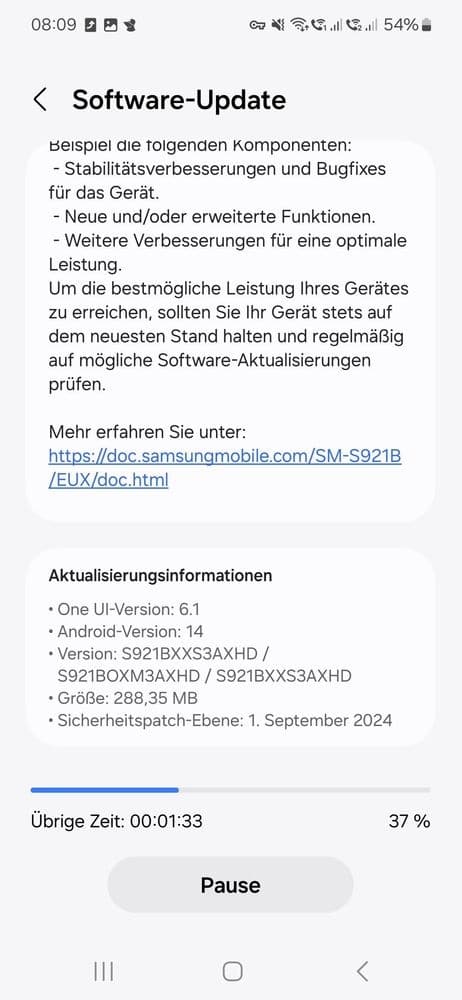
Samsung’s September SMR for Galaxy devices patches 67 vulnerabilities, a combined total of Android OS and Galaxy bugs. At least one of these is a critical security flaw fixed by Google. The Korean firm has already pushed these fixes to dozens of Galaxy phones and tablets globally. Galaxy S24 users should receive it soon as Samsung gradually expands the rollout to other markets.
If you are using Samsung’s recent flagship phones, expect the September security patch to hit you in the coming days if it hasn’t already. In some regions, it arrives bundled with One UI 6.1.1, while others receive it via a separate update. You can always check for software updates manually on your Galaxy device. Go to the Software update menu in Settings and tap Download and install.

Written by
Sumit AdhikariSumit, a life-long Samsung user, is passionate about technology and has been professionally writing on tech since 2017. He’s a mathematics graduate by education and enjoys teaching basic mathematics tricks to school kids in his spare time. Sumit believes in artificial intelligence and dreams of a fully open, intelligent and connected world.

Follow us on Google Discover & set us as a preferred source in Google News
Share this Post
___________________________


New Blog Posts
___________________________

Samsung Quietly Listed a New Entry Level 990 PCIe 4.0 SSD
It drops DRAM for HMB

Samsung’s First Bone-Conduction Earbuds May Be Called Galaxy Able
Name hidden no more

Samsung Accidentally Confirms Galaxy Watch 9 and Galaxy Watch Ultra 2
Coming very soon







