
Samsung Wallet Integration Simplifies Travel with American Airlines

SammyGuru is reader-supported. We have affiliate and sponsored partnerships, so we may earn a commission when you buy through links on our site — at no extra cost to you. Learn more.
Samsung Wallet is making air travel simpler for Galaxy users flying with American Airlines. Thanks to a new integration, travelers can now manage key parts of their journey directly from the Wallet app. From boarding passes and real-time flight updates to luggage tracking, everything is neatly organized in one streamlined, unified experience.
Boarding passes, live updates, and baggage tracking in one place
American Airlines is the first US carrier to work directly with Samsung’s digital wallet platform. The carrier lets you transfer your boarding pass from its app to Samsung Wallet with a single tap. Once you do that, all essential travel details are available at a glance. The boarding pass can be accessed via the Quick Access tab on Galaxy phones or viewed directly on supported Galaxy watches.
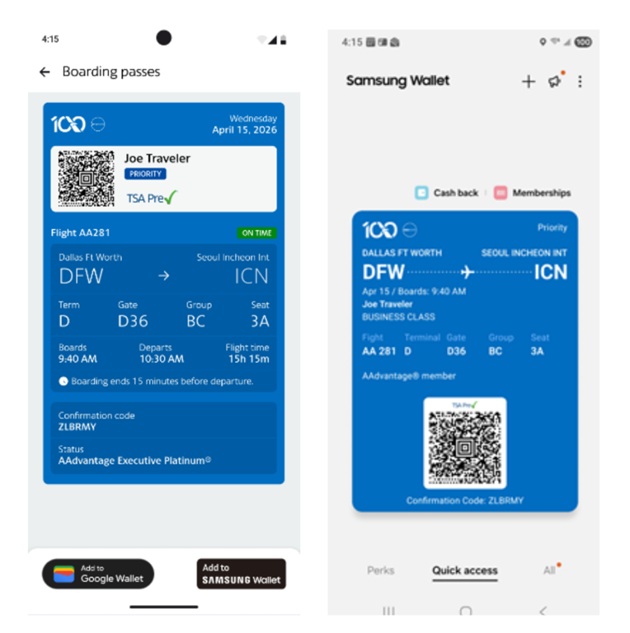
Samsung Wallet displays your flight date and time, gate and terminal information, flight number, and assigned seat. If anything changes, such as a gate switch or schedule adjustment, the app sends real-time notifications, helping travelers stay informed without constantly refreshing the airline app.
One of the standout features is luggage tracking. Through Samsung Wallet, users can tap “Track Bags with SmartTag” to link a Galaxy SmartTag to their boarding pass. This allows travelers to monitor their luggage location using Samsung’s Find network. With flight information and bag tracking combined in a single interface, Galaxy users get a more seamless travel experience.
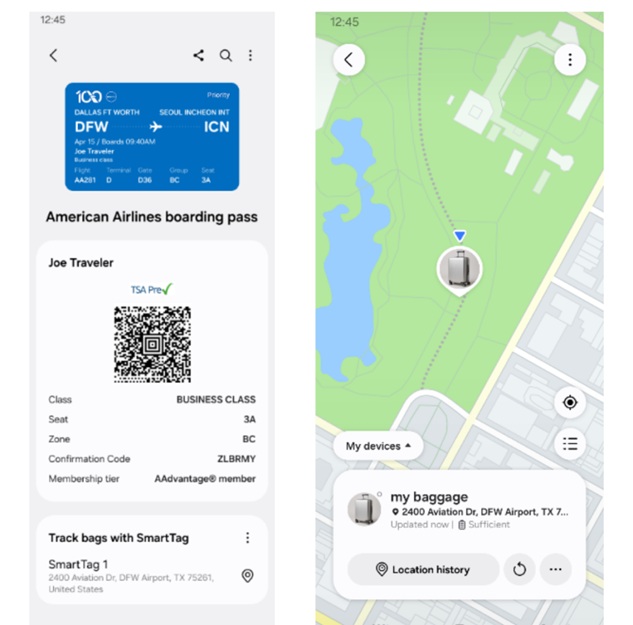
You can also link Samsung Wallet with Samsung Calendar to sync your travel details, making it easier to keep your schedule organized. On devices running One UI 8 or later, upcoming trips also appear in the Now Brief section, offering a snapshot of your travel plans right from the home screen. This tight integration helps reduce the need to jump between multiple apps when preparing for a trip.

Written by
Sumit AdhikariSumit, a life-long Samsung user, is passionate about technology and has been professionally writing on tech since 2017. He’s a mathematics graduate by education and enjoys teaching basic mathematics tricks to school kids in his spare time. Sumit believes in artificial intelligence and dreams of a fully open, intelligent and connected world.

Follow us on Google Discover & set us as a preferred source in Google News
Share this Post
___________________________


New Blog Posts
___________________________

Samsung Quietly Listed a New Entry Level 990 PCIe 4.0 SSD
It drops DRAM for HMB

Samsung’s First Bone-Conduction Earbuds May Be Called Galaxy Able
Name hidden no more

Samsung Accidentally Confirms Galaxy Watch 9 and Galaxy Watch Ultra 2
Coming very soon







