
Samsung Rolls Out May 2026 Update for Galaxy S25 Lineup

SammyGuru is reader-supported. We have affiliate and sponsored partnerships, so we may earn a commission when you buy through links on our site — at no extra cost to you. Learn more.
Samsung’s May 2026 update is now available for the Galaxy S25 series. This follows an earlier rollout for the S26 lineup and a bunch of other devices, including several mid-range models. More Galaxy smartphones and tablets should get the new security patch in the coming days.
Galaxy S25 series gets the May 2026 update from Samsung
Earlier this month, Samsung rolled out One UI 8.5 for the Galaxy S25 lineup. The company has now followed up with a new update, introducing the latest security patches. The Galaxy S25, S5+, and S25 Ultra are currently picking up the May 2026 security release in India. The update carries firmware version CZE1 and has a download size of roughly 545MB for the Ultra model.
This security release should soon hit the Galaxy S25 FE and S25 Edge, and also roll out in global markets. The build version and file size may vary depending on the model and region, but the entire lineup gets the same thing. That is, the latest security fixes from Samsung, Google, and their partners. This month’s patch addresses nearly 40 vulnerabilities across the Galaxy family.
The May 2026 security update will gradually reach more Galaxy devices. Users can always check for updates on their phones from Settings > Software update > Download and install. If an update is available, you may be prompted to download it, or it starts downloading automatically (in that case, you have the option to pause downloading).
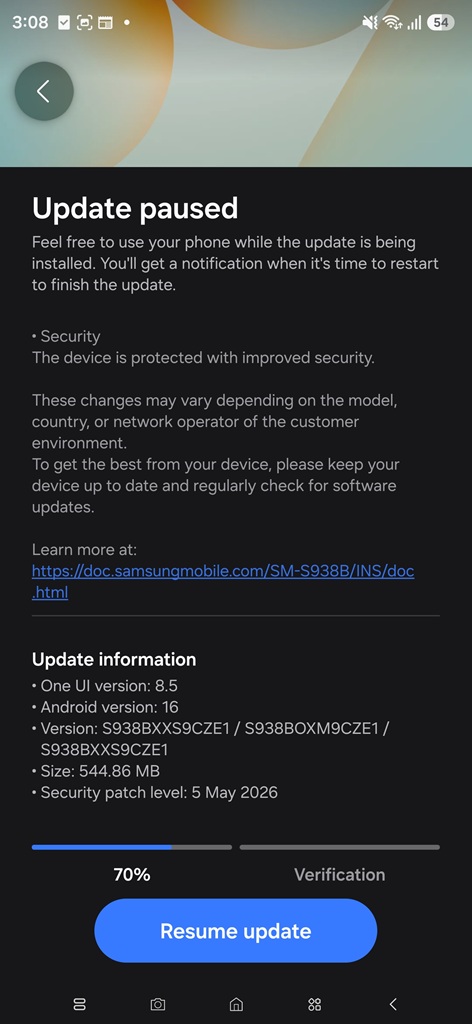
Newer models, particularly flagships and premium mid-range devices, support seamless updates, so installation happens in the background. You simply have to restart your phone at your convenience to complete the process. You can also schedule a restart for your device. Users with older models, meanwhile, have to sit out when the update starts installing.

Written by
Sumit AdhikariSumit, a life-long Samsung user, is passionate about technology and has been professionally writing on tech since 2017. He’s a mathematics graduate by education and enjoys teaching basic mathematics tricks to school kids in his spare time. Sumit believes in artificial intelligence and dreams of a fully open, intelligent and connected world.

Follow us on Google Discover & set us as a preferred source in Google News
Share this Post
___________________________


New Blog Posts
___________________________

Samsung Quietly Listed a New Entry Level 990 PCIe 4.0 SSD
It drops DRAM for HMB

Samsung’s First Bone-Conduction Earbuds May Be Called Galaxy Able
Name hidden no more

Samsung Accidentally Confirms Galaxy Watch 9 and Galaxy Watch Ultra 2
Coming very soon







