Samsung Begins Global Rollout of One UI 8 for Galaxy Watch 7
SammyGuru is reader-supported. We have affiliate and sponsored partnerships, so we may earn a commission when you buy through links on our site — at no extra cost to you. Learn more.
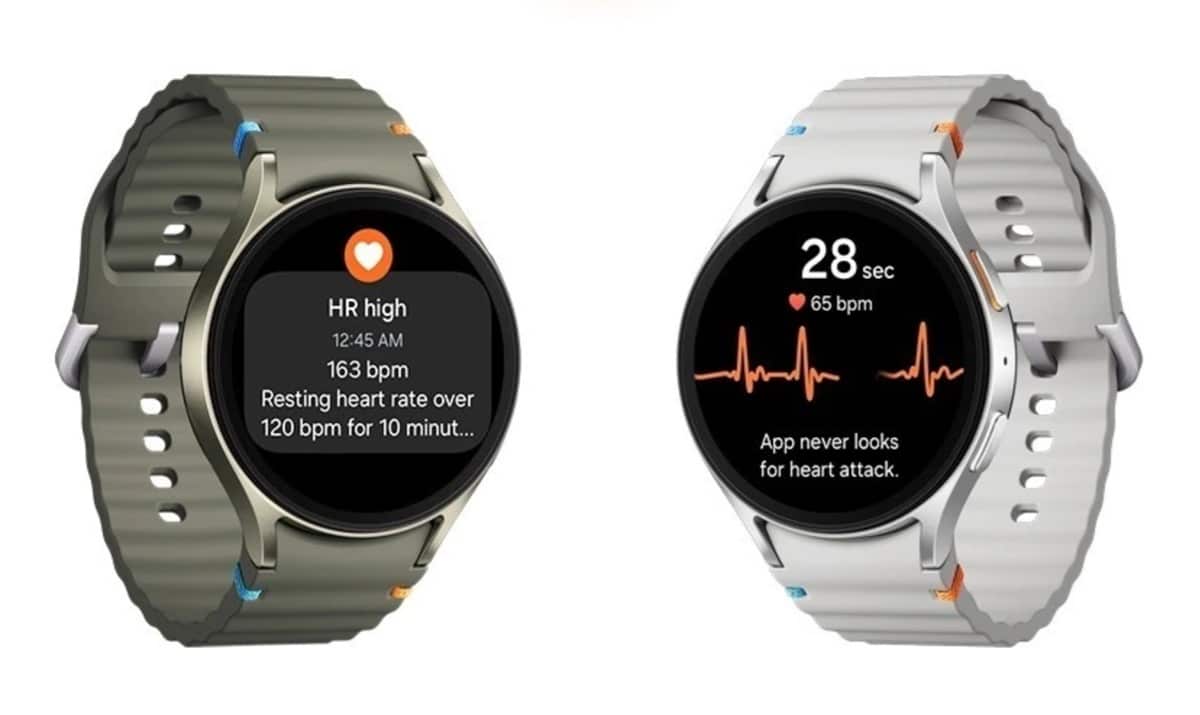
Samsung’s One UI 8 Watch update is now rolling out widely for the Galaxy Watch 7. After debuting last week in South Korea and the US — the two beta-supported markets — the update is reaching global markets. It brings a refreshed UI and several new features, including Samsung Health upgrades.
Galaxy Watch 7 gets the One UI 8 update globally
Based on Wear OS 6, One UI 8 Watch is the latest iteration of Samsung’s smartwatch platform. The update is now rolling out for the Galaxy Watch 7 in Europe, Asia, and other international markets. It follows the Galaxy Watch Ultra (2024) to receive the stable version. The Galaxy Watch 8 series and Watch Ultra (2025) shipped with One UI 8 Watch out of the box.
Both the Bluetooth and Wi-Fi versions of the Galaxy Watch 7 are picking up this update. The new firmware build number ends with BY14, while the OTA package weighs around 1.9GB. It also bundles the September 2025 security patch, ensuring enhanced performance and protection.
As far as new features and enhancements are concerned, One UI 8 Watch introduces redesigned app icons, watch faces, widgets, and a new charging animation. Samsung has also introduced a grid app drawer layout option alongside the traditional list view, giving users more flexibility in how they navigate apps.
Notifications for messages now appear in grouped stacks, and you can clear them using a double pinch gesture. The gesture itself is more powerful than ever, letting you scroll through notifications, control music, snap photos, and more. Additionally, the Samsung Health app received several upgrades, including Bedtime Guidance for improved sleep tracking, Running Coach with more personalized insights, and Expanded Mindfulness tools.
If you own a Galaxy Watch 7, you can check for the One UI 8 Watch update by opening the Galaxy Wearable app on your phone and navigating to Watch settings > Watch software update > Download and install. Once the download completes, tap Install now to apply the update.

Written by
Sumit AdhikariSumit, a life-long Samsung user, is passionate about technology and has been professionally writing on tech since 2017. He’s a mathematics graduate by education and enjoys teaching basic mathematics tricks to school kids in his spare time. Sumit believes in artificial intelligence and dreams of a fully open, intelligent and connected world.

Follow us on Google Discover & set us as a preferred source in Google News
Share this Post
___________________________


New Blog Posts
___________________________
Samsung Brings ClockFace and RegiStar up to Speed for One UI 9
ClockFace finally supports One UI 9
Samsung’s HBM4E Reliability Yield Surpasses 70%
This suggests the chip could soon enter the stable production stage

Apple May Have Just Made Samsung’s Next Price Hike Much Easier
AI is making your next phone more expensive