Google Messages Rolls Out Quality-of-Life Upgrade for Smart Replies

SammyGuru is reader-supported. We have affiliate and sponsored partnerships, so we may earn a commission when you buy through links on our site — at no extra cost to you. Learn more.
Google has been working on a fix for accidental Smart Reply sends in Google Messages for quite some time. The company has now brought a “Tap to draft” option that lets users edit suggested replies before sending them. The feature is currently rolling out to everyone through the stable channel.
You can now draft smart replies before sending in Google Messages
Google Messages offers Smart Reply, an AI feature that suggests quick responses depending on the context of a conversation. It analyzes recent messages and shows ready-to-use reply suggestions. As a result, you can respond without typing a message from scratch.
However, the feature previously had a drawback. Tapping on a Smart Reply instantly sent the response to the chat. Of course, this made replying quicker, but it also increased the chances of accidental sends. Some users even chose to disable the feature despite its convenience.
Thankfully, Google has now addressed this issue with a new “Tap to draft” option. Now, when you pick a suggested response, it shows up in the compose field first instead of being sent immediately. This means you can now review the message and make changes if necessary. Once you are ready, you can manually press the send button.
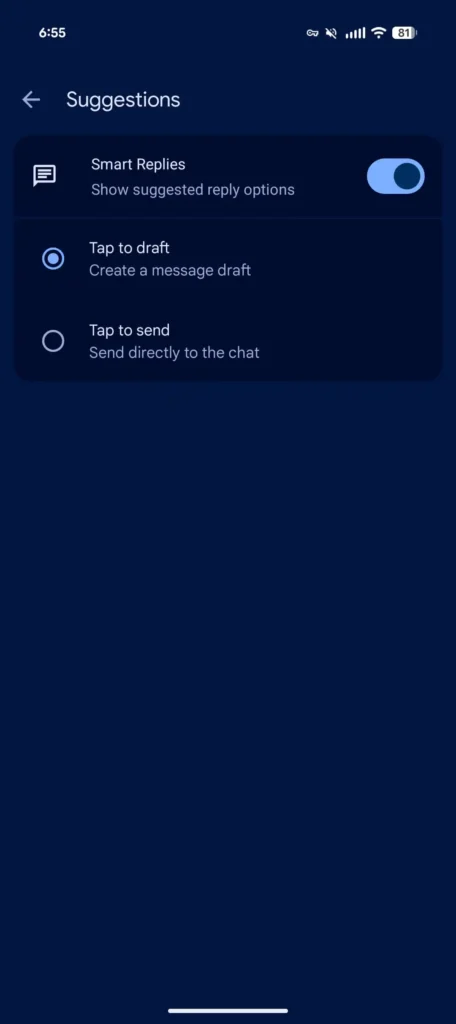
The new option is accessible through Settings > Suggestions & Actions > Suggestions in Google Messages. As you can see in the image above, there is also a “Tap to send” option that keeps the old behavior of instantly sending a Smart Reply. This is the default setting, so you will need to manually switch to “Tap to draft” to edit suggested replies.
9to5Google reports that the latest stable version (20260522_00_RC00) of Google Messages for Android has brought the “Tap to draft” option. So, make sure your messaging platform is running that build to take advantage of this nice quality-of-life improvement.

Written by
Binay KonwarBinay Konwar started his blogging journey in 2014 and has since written plenty of tech articles. At present, he is working as a News Writer at SammyGuru, covering everything about Samsung. He holds a Master's degree in Mathematics, but his real passion lies in tech and writing. In his free time, he enjoys playing chess and watching movies.

Follow us on Google Discover & set us as a preferred source in Google News
Share this Post
___________________________


New Blog Posts
___________________________
Galaxy A07s Takes Another Step Toward Launch With New Certification
Galaxy A07s is coming soon
Galaxy Devices That Have Received June 2026 Security Update
List of Galaxy devices picking up June 2026 security update

Galaxy Z Fold 8 Ultra, Fold 8, Flip 8 Official Names Confirmed via NBTC
A new Ultra is coming!