
Google Addresses Messages App Complaints with Split Camera and Gallery Access

SammyGuru is reader-supported. We have affiliate and sponsored partnerships, so we may earn a commission when you buy through links on our site — at no extra cost to you. Learn more.
Google continues to improve the user experience of its Messages app through regular updates. However, some users did not like the recent change that combined the camera and gallery interfaces, resulting in multiple complaints. The company now appears to have addressed this inconvenience in its latest beta update, allowing users to access each feature separately.
Google Messages separates Camera and Gallery options after user feedback
A few weeks ago, Google introduced a redesigned media attachment interface to the Messages app that automatically activates the camera if users try to add an image. While the company’s intention was to simplify the process, many found it frustrating, mainly those who simply wanted to upload existing photos from the gallery. Thankfully, Google has now listened to user feedback and added separate Camera and Gallery options within the Plus (+) menu.
A Reddit user (via 9to5Google) recently noticed this change while using the beta version of the Messages app. The user wrote, “Gallery only brings up the gallery with no camera access, and camera brings the same camera with the gallery at the bottom.” Now, once you tap on the Camera button, it launches the viewfinder directly, while the Gallery option only opens the photo picker.
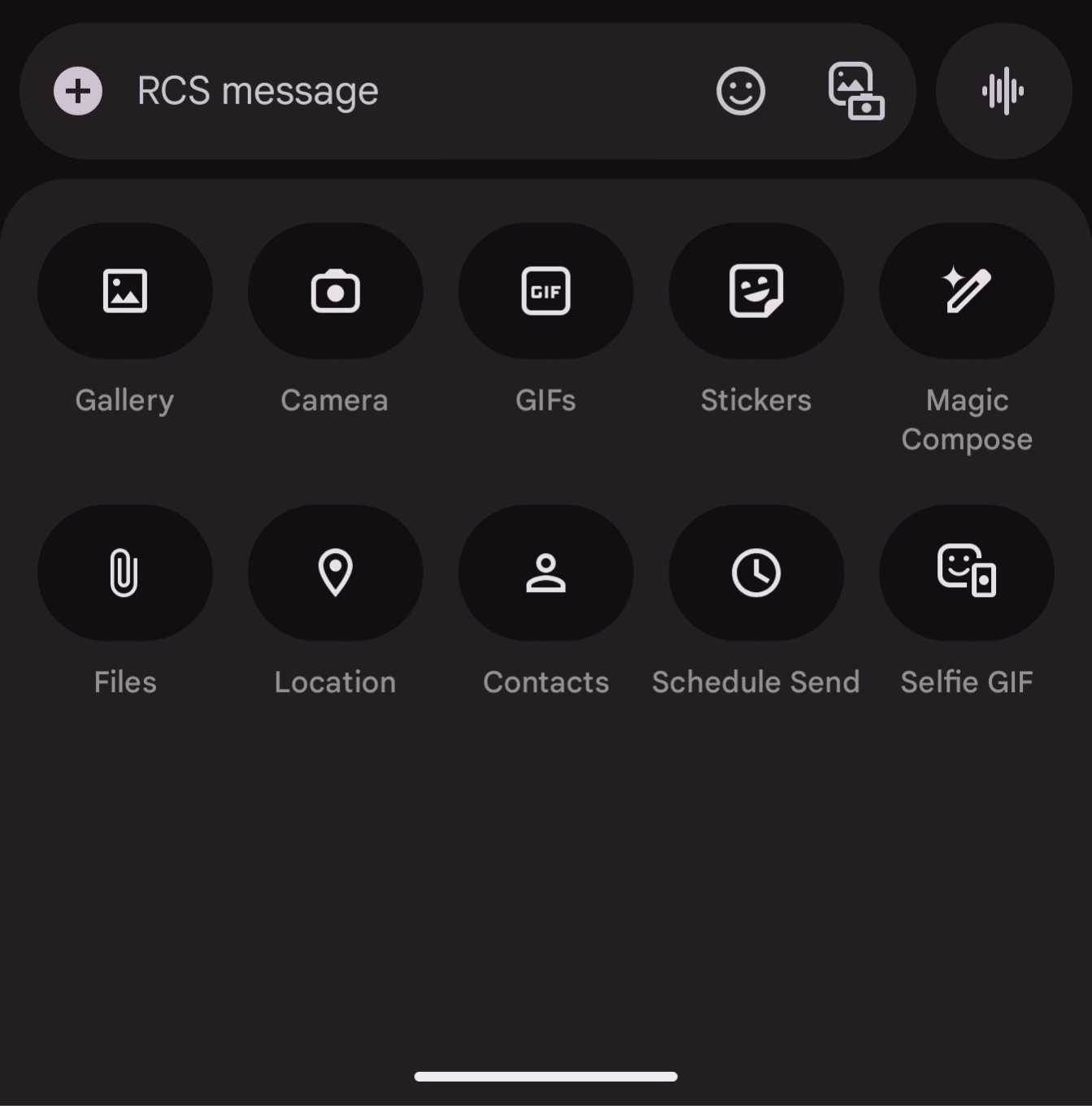
In addition to the Camera and Gallery options, you will also find a bunch of sharing tools within the menu. These include GIFs, Stickers, Magic Compose, Files, Location, Contacts, Schedule Send, and Selfie GIF. Simply put, you now have separate control over each sharing tool.
As for when you will see these changes in your Messages app, you will probably have to wait a few weeks. If you are using the beta version, you may notice them right away. While you wait for the update to reach the stable channel, there’s a workaround to prevent the camera from launching when you open the gallery in the app. The trick is to simply disable the camera permission granted to Google Messages. We will let you know once the new interface rolls out widely. Stay tuned.

Written by
Binay KonwarBinay Konwar started his blogging journey in 2014 and has since written plenty of tech articles. At present, he is working as a News Writer at SammyGuru, covering everything about Samsung. He holds a Master's degree in Mathematics, but his real passion lies in tech and writing. In his free time, he enjoys playing chess and watching movies.

Follow us on Google Discover & set us as a preferred source in Google News
Share this Post
___________________________


New Blog Posts
___________________________

Samsung Quietly Listed a New Entry Level 990 PCIe 4.0 SSD
It drops DRAM for HMB

Samsung’s First Bone-Conduction Earbuds May Be Called Galaxy Able
Name hidden no more

Samsung Accidentally Confirms Galaxy Watch 9 and Galaxy Watch Ultra 2
Coming very soon







