
Gmail’s Dual Panel View Finally Comes to Portrait Mode on Foldables

SammyGuru is reader-supported. We have affiliate and sponsored partnerships, so we may earn a commission when you buy through links on our site — at no extra cost to you. Learn more.
Gmail comes pre-installed on every Android phone, and most of us use it regularly. It’s been a go-to app for checking email for years. But on foldable devices, its interface hasn’t always made the best use of the larger screens. On Galaxy Z Fold devices, the Gmail app’s dual panel view used to work only in landscape mode.
This meant that if you were holding your foldable in portrait mode, which often feels more natural, you were stuck with the basic single-column view. It felt like a missed trick, especially on a device built to combine the best of both phones and tablets.
Gmail seems to be rolling out dual panel view in portrait orientation
That limitation is finally gone, and for good reason. With a quiet update, Google is now rolling out the Dual Panel View for Gmail in portrait mode on foldables. It’s not enabled by default, and there’s no setting toggle to turn it on.
Instead, there’s a small, pill-shaped handle along the right edge of the app when you’re in portrait mode. Drag it to the left, and just like that, the screen splits—your inbox appears on the left, and the opened email shows up on the right, just like in landscape view.

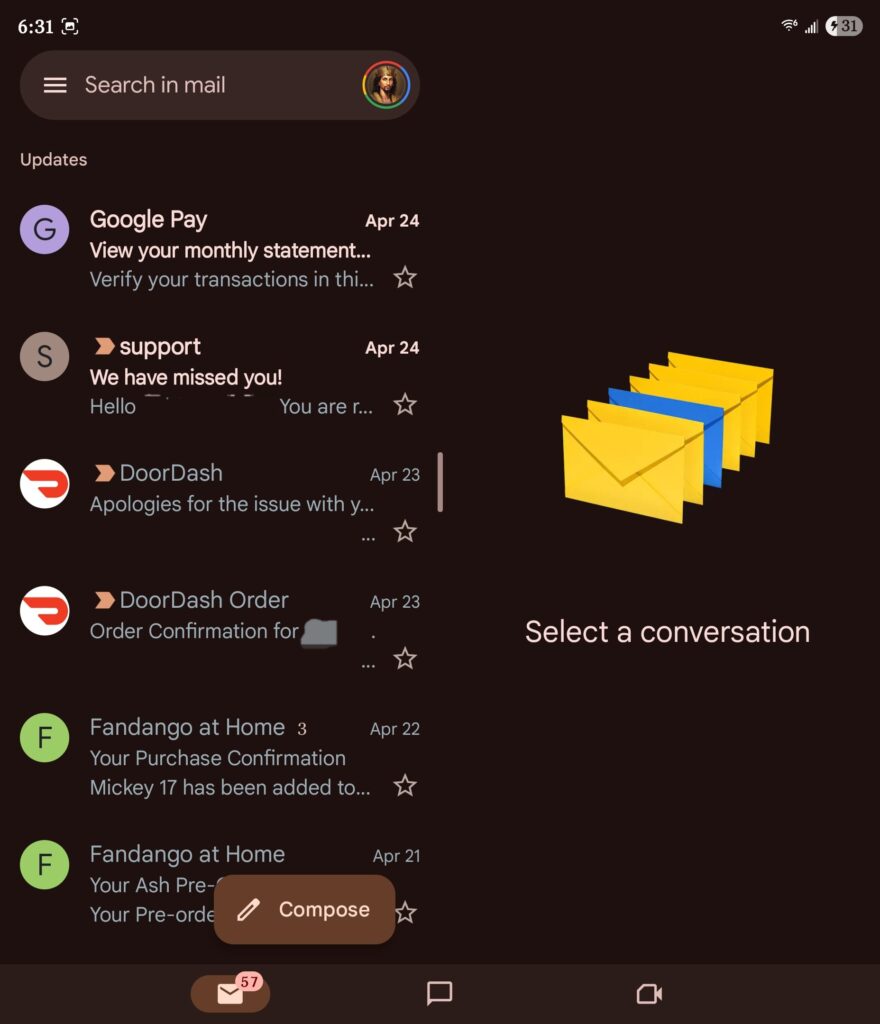
Screenshots: X/@Rove_McClain
It’s a small change, but it makes a big difference. Reading and managing emails on the go feels much smoother now. As shared in screenshots, the transition is seamless, and the added multitasking boost is easy to notice. It really shines when you’re handling long email threads or jumping between messages.
This is how Gmail should have worked on foldables from the start. It finally brings the productivity boost users have been waiting for. If you have a Fold, make sure your Gmail app is up to date, you might already have the feature ready.
Thanks for the tip, @Rove_McClain!

Written by
Abhinav AnandAbhinav Anand is the News Editor at SammyGuru and a technology journalist based in New Delhi. Before joining SammyGuru, he contributed to numerous outlets, including Android Headlines, ExtremeTech, The Mac Observer, Financial Express, Economic Times, iGeeksBlog, KnowTechie, PhonesWiki, SlashGear, and more. You can reach him at [email protected].

Follow us on Google Discover & set us as a preferred source in Google News
Share this Post
___________________________


New Blog Posts
___________________________

Samsung Quietly Listed a New Entry Level 990 PCIe 4.0 SSD
It drops DRAM for HMB

Samsung’s First Bone-Conduction Earbuds May Be Called Galaxy Able
Name hidden no more

Samsung Accidentally Confirms Galaxy Watch 9 and Galaxy Watch Ultra 2
Coming very soon







