Gemini Live Interface Drops Fullscreen Design

SammyGuru is reader-supported. We have affiliate and sponsored partnerships, so we may earn a commission when you buy through links on our site — at no extra cost to you. Learn more.
Google has made major design tweaks to Gemini Live, its real-time voice assistant. The interface ditches the fullscreen experience that users have been familiar with since launch. This change is currently rolling out to beta users of the Google app. So if you are on a stable build, you will have to wait before you see it.
Google makes major changes to Gemini Live
Gemini Live is a feature within the Gemini app that lets you have real-time voice conversations with an AI assistant. It supports features like camera sharing and screen sharing, so you get assistance based on what they are looking at. This comes in handy for a host of tasks, like getting step-by-step project guidance or troubleshooting advice.
To launch Gemini Live on the Gemini app, you can tap the Live icon in the bottom right corner. Until now, you saw a fullscreen interface that took up the entire screen when you started a live conversation. While this made the experience immersive, it left the main app interface completely.
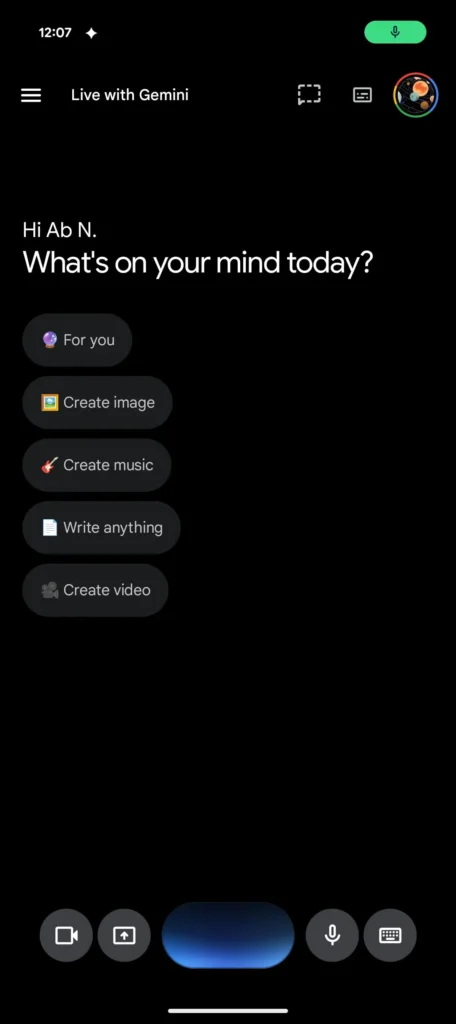
Now, Google has removed Gemini Live’s fullscreen mode and integrated it into the main Gemini app screen. The top of the screen shows “Live with Gemini,” alongside a transcript button. At the bottom, you can see a small pill-shaped container with a blue waveform, replacing the older input box.
On the sides of the container, you get access to camera sharing, screen sharing, and microphone and keyboard icons. The former two sit on the left, while the latter two sit on the right. This ensures key controls remain within comfortable reach during a live conversation.
Needless to say, Camera and screen sharing provide quick visual help. On the other hand, the microphone and keyboard controls manage audio and switch to text input. However, the Gemini Live redesign has not yet hit the stable channel. Users running the Google app beta version 17.14 are currently seeing the new interface.

Written by
Binay KonwarBinay Konwar started his blogging journey in 2014 and has since written plenty of tech articles. At present, he is working as a News Writer at SammyGuru, covering everything about Samsung. He holds a Master's degree in Mathematics, but his real passion lies in tech and writing. In his free time, he enjoys playing chess and watching movies.

Follow us on Google Discover & set us as a preferred source in Google News
Share this Post
___________________________


New Blog Posts
___________________________

Exynos 2700 Could Run Cooler Thanks to a Major Hardware Change
Will Exynos finally outshine competition with this trick?
Google Maps May Soon Let Ask Maps Order Food for You With Gemini
Are you excited?

Missed Prime Day? This Galaxy A57 Deal Is Back
Your chance to save $100 on the Galaxy A57