Galaxy Watch 7, Watch Ultra Can Auto-Power On When Charging
SammyGuru is reader-supported. We have affiliate and sponsored partnerships, so we may earn a commission when you buy through links on our site — at no extra cost to you. Learn more.
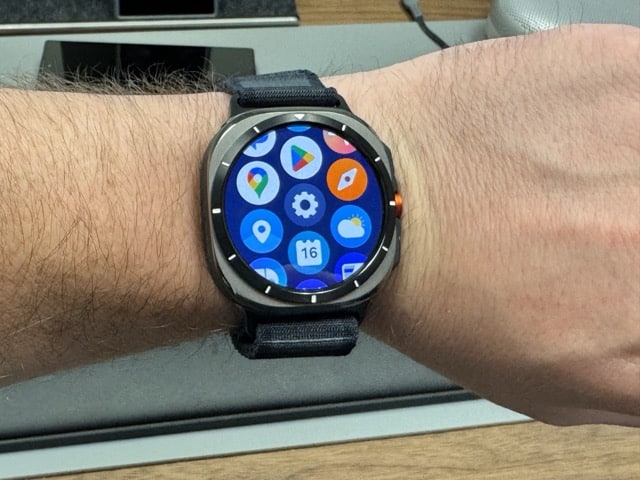
Samsung’s Galaxy Watch 7 and Galaxy Watch Ultra can power on automatically when charging. It’s an optional feature you can enable from Settings. Galaxy Watch 6 and older models need to be turned on manually once the battery runs out. The One UI 6 Watch update should bring the new feature to other Galaxy watches.
Set your Galaxy Watch 7 or Ultra to automatically turn on when charging
Unlike phones, smartwatches charge slowly. If you let the battery drain out completely, the watch takes some time to refill enough juice to power it on smoothly. This can be an annoying wait if you need to turn it on immediately. You end up repeatedly pressing and holding the power button but the screen doesn’t light up.
Samsung fixed this problem on the Galaxy Watch 7 and Galaxy Watch Ultra. An optional toggle in Settings lets you set the new watches to power on automatically after refilling enough battery juice. The new setting is fairly easy to enable and works as intended. No more repeated pressing of the power button when the watch is charging.
To enable it, open the Settings app (you can swipe down on the home screen and select the gear icon or swipe up to find the same icon on the app drawer) and go to the Device care menu. Now select Battery and scroll down to the bottom to find the Auto power on option. Enable the toggle and you are all set.
Your Galaxy Watch 7 or Galaxy Watch Ultra will now turn on automatically when charging. Since it is a One UI 6 Watch feature, older Samsung watches should get this toggle with the big update. The company is currently beta testing the new One UI version, which brings Wear OS 5. A public rollout may begin soon as some new features are already showing up on older models.

Written by
Sumit AdhikariSumit, a life-long Samsung user, is passionate about technology and has been professionally writing on tech since 2017. He’s a mathematics graduate by education and enjoys teaching basic mathematics tricks to school kids in his spare time. Sumit believes in artificial intelligence and dreams of a fully open, intelligent and connected world.

Follow us on Google Discover & set us as a preferred source in Google News
Share this Post
___________________________


New Blog Posts
___________________________

Samsung Accidentally Confirms Galaxy Watch 9 and Galaxy Watch Ultra 2
Coming very soon

Exynos 2700 Could Run Cooler Thanks to a Major Hardware Change
Will Exynos finally outshine competition with this trick?
Google Maps May Soon Let Ask Maps Order Food for You With Gemini
Are you excited?