
Android 16 (One UI 8) Boosts Security with Enhanced Advanced Protection Features
SammyGuru is reader-supported. We have affiliate and sponsored partnerships, so we may earn a commission when you buy through links on our site — at no extra cost to you. Learn more.
Google keeps enhancing its Android security features to protect users from scams, theft, and other security threats. With Android 16, the company will further enhance the security and privacy that builds on the company’s industry-leading protections. It will bring several security enhancements as part of its Advanced Protection Program. We can expect Android 16-based One UI 8 to also bundle these enhancements for Galaxy users.
Google expands Android security with new Advanced Protection tools in Android 16
In its security blog, Google said that Android 16 extends Advanced Protection with a device-level security setting for Android users. Advanced Protection lets you activate Google’s strongest security for your mobile devices, helping protect you against the most sophisticated threats.
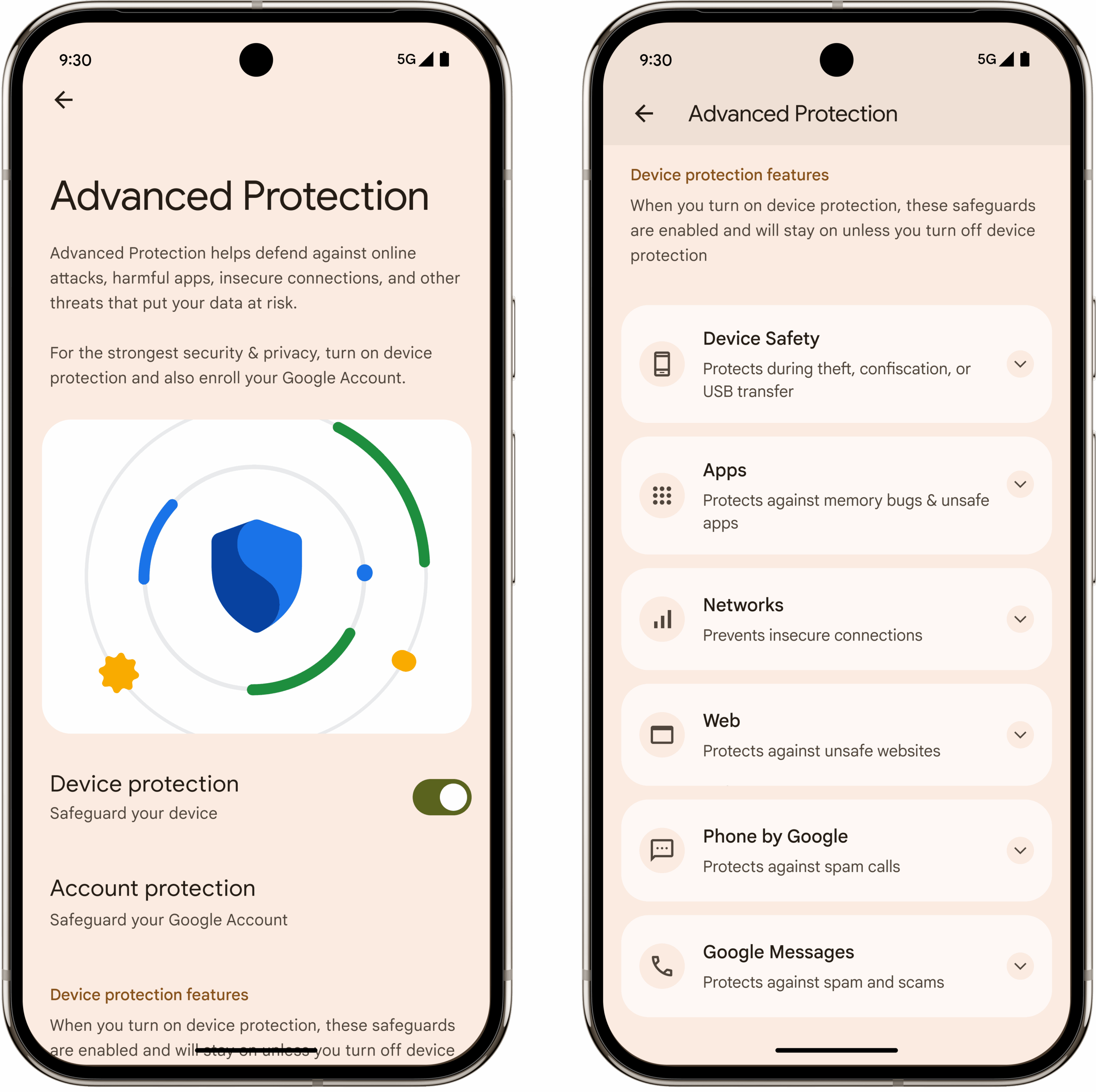
The company says that after the release of Android 16, users can activate Advanced Protection to access a core suite of enhanced security features that safeguard you against online attacks, harmful apps, and data risks. When you enable Advanced Protection, it prevents anyone from accidentally or intentionally turning off its security features under the Advanced Protection umbrella. This becomes possible as several layers of security work together, which reflects the defense-in-depth strategy.
It also offers seamless security integration across several Google apps, including Chrome, Google Messages, and Phone by Google. The company also says Advanced Protection will include third-party applications in the future if developers want to join the program.
Advanced Protection activates and manages several existing and new security features on your device. Speaking of the latest security features, the most notable feature is the Intrusion Logging, which securely backs up device logs and comes in handy in the event of suspicious activity. Other new features include Inactivity Reboot, USB Protection, and Disable Auto-Reconnect to Insecure Networks.
However, these new features will be rolled out later this year, not immediately after the release of Android 16 next month. Some popular security features already part of Advanced Protection include Theft Detection Lock, Android Safe Browsing, Spam & Scam Protection, Unsafe Links, and more.

Written by
Binay KonwarBinay Konwar started his blogging journey in 2014 and has since written plenty of tech articles. At present, he is working as a News Writer at SammyGuru, covering everything about Samsung. He holds a Master's degree in Mathematics, but his real passion lies in tech and writing. In his free time, he enjoys playing chess and watching movies.

Follow us on Google Discover & set us as a preferred source in Google News
Share this Post
___________________________


New Blog Posts
___________________________

Samsung Quietly Listed a New Entry Level 990 PCIe 4.0 SSD
It drops DRAM for HMB

Samsung’s First Bone-Conduction Earbuds May Be Called Galaxy Able
Name hidden no more

Samsung Accidentally Confirms Galaxy Watch 9 and Galaxy Watch Ultra 2
Coming very soon







