Google Messages Shrinks Camera View to Show More Gallery Photos

SammyGuru is reader-supported. We have affiliate and sponsored partnerships, so we may earn a commission when you buy through links on our site — at no extra cost to you. Learn more.
Google Messages continues to improve the photo and video sharing experience. The app now gets a revamped camera and gallery interface for greater visibility of gallery contents. The company is rolling out the tweaks gradually in the stable channel, likely through a server-side update.
Google makes Gallery content more visible in Messages
According to a report from 9to5Google, Google Messages has started getting a new update with version 20251121_00_RC02. The update focuses on improving the unified camera and gallery view that shows up when users attach images in a chat. The goal is to show more gallery content on the screen.
As you can see in the images below (old vs new), Google has slightly reduced the height of the camera view in the messaging platform. It now sits inside a container with rounded corners at the top and bottom. While the camera view extends into the system status bar area, it does not take up too much space. Previously, the system bar remained separate from the camera view, resulting in a larger area while leaving less room for gallery images below.
-
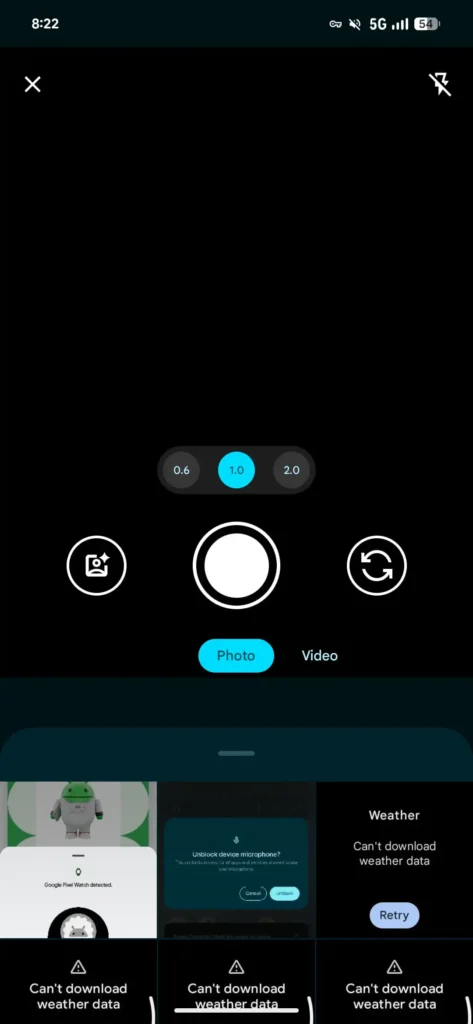
- Old
-

- New
Thanks to the reduced camera view size, you can now see more images from the gallery at once. It displays two full rows of photos in a 2×3 grid. Previously, we saw only about one and a half rows, limiting gallery visibility. That said, on some devices, you may also see a small portion of the third row depending on screen settings.
This tweak should come in handy if you often share screenshots, memes, or other images in chats. Note that you can still scroll through your gallery to access more photos. The update did not make any changes to the camera buttons. If you haven’t received the new camera and gallery interface in Google Messages yet, you can try force-stopping the app to trigger the server-side update.

Written by
Binay KonwarBinay Konwar started his blogging journey in 2014 and has since written plenty of tech articles. At present, he is working as a News Writer at SammyGuru, covering everything about Samsung. He holds a Master's degree in Mathematics, but his real passion lies in tech and writing. In his free time, he enjoys playing chess and watching movies.

Follow us on Google Discover & set us as a preferred source in Google News
Share this Post
___________________________


New Blog Posts
___________________________
Google Wallet Finally Fixes One of Its Most Annoying Wear OS Quirks
Finally, one can manage all of my receipts from both devices

Samsung Quietly Listed a New Entry Level 990 PCIe 4.0 SSD
It drops DRAM for HMB

Samsung’s First Bone-Conduction Earbuds May Be Called Galaxy Able
Name hidden no more