Galaxy Watch Gets Battery Health Boost with One UI 8 Watch Update

SammyGuru is reader-supported. We have affiliate and sponsored partnerships, so we may earn a commission when you buy through links on our site — at no extra cost to you. Learn more.
If you care about the battery longevity of your Galaxy Watch, Samsung now has a solution to help. The company has introduced a Battery Protection feature with its latest One UI 8 Watch update. This feature limits the charge to 90%, helping you preserve battery health.
Galaxy Watch users can limit charging to 90% with One UI 8 Watch
Alongside its latest smartwatches — the Galaxy Watch 8, Watch 8 Classic, and Watch Ultra (2025) — Samsung also debuted its latest wearable software update, One UI 8 Watch. Based on Wear OS 6, the new software introduces a refreshed UI design and a host of new health features. More notably, it brings a useful battery management tool called Battery Protection.
However, this comes as no surprise, as we already learned that Samsung was planning to introduce a useful feature for smartwatches aimed at extending battery life over time. As you know, Samsung already offers a Battery Protection feature for Galaxy smartphones, which limits charging to 85%. Until now, Galaxy Watches were missing this capability, but One UI 8 Watch finally brings it to wearables.
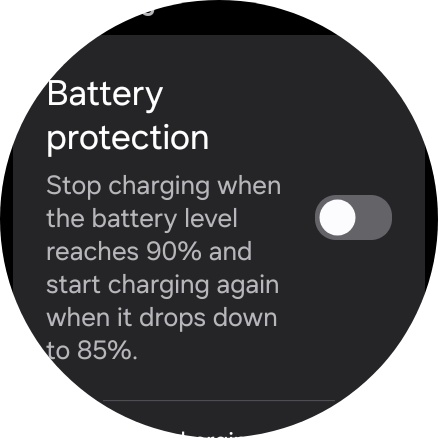
Speaking of the new battery feature, the Galaxy Watch stops charging once it reaches 90% and resumes only when it drops to 85%. You might be thinking, ‘How is that helpful if you are not getting a full charge?’ Well, continuously charging a battery to 100% can gradually degrade its health, meaning it negatively impacts the battery’s lifespan. This feature mainly comes in handy if you have a habit of charging your smartwatch overnight.
To turn on the feature, head over to Settings > Battery on your Galaxy Watch. Another way is to open the Galaxy Wearable app on your connected phone and enable it by going to Watch settings > Battery. However, your Galaxy Watch must be running One UI 8 Watch to access this feature. Thankfully, a bunch of older Galaxy Watches — including the Watch 4 series — are set to receive the stable update in the coming months.

Written by
Binay KonwarBinay Konwar started his blogging journey in 2014 and has since written plenty of tech articles. At present, he is working as a News Writer at SammyGuru, covering everything about Samsung. He holds a Master's degree in Mathematics, but his real passion lies in tech and writing. In his free time, he enjoys playing chess and watching movies.

Follow us on Google Discover & set us as a preferred source in Google News
Share this Post
___________________________


New Blog Posts
___________________________
Google Photos Rolls Out New Floating Bottom Bar on Android
It floats

Introducing SammyGuru Rewards — Read, Earn, and Redeem
Our biggest update yet
Samsung’s Odyssey G8 Will Power Crimson Desert Demos at Gamescom 2026
In Cologne, August 36-August 30