Galaxy S25’s Big April Update Rolls Out in More Markets

SammyGuru is reader-supported. We have affiliate and sponsored partnerships, so we may earn a commission when you buy through links on our site — at no extra cost to you. Learn more.
Samsung has begun a wider release of the “big” April update for the Galaxy S25 series. Rolled out in South Korea a few days ago, the update is now available in more markets, including India. It should go global soon, finally bringing the “true” One UI 7 experience to more Galaxy S25 users.
This update adds missing One UI 7 features to the Galaxy S25 trio
The April update for the Galaxy S25, S25+, and S25 Ultra is particularly notable because it adds One UI 7 features that were missing from the lineup at launch. One key addition is media playback controls in live notifications. When you play media on your phone, a chip will appear in the Now Bar at the top left of the screen. Tapping it opens a floating pop-up with playback controls.
You also get the ability to control media directly from the notification shade without opening the quick settings panel. Additionally, the Galaxy S25 series picks up new and improved charging animation, updated battery icon, and camera stability improvements. Samsung has already rolled out these goodies to older models updated from One UI 6 to One UI 7 — either the stable or beta version.
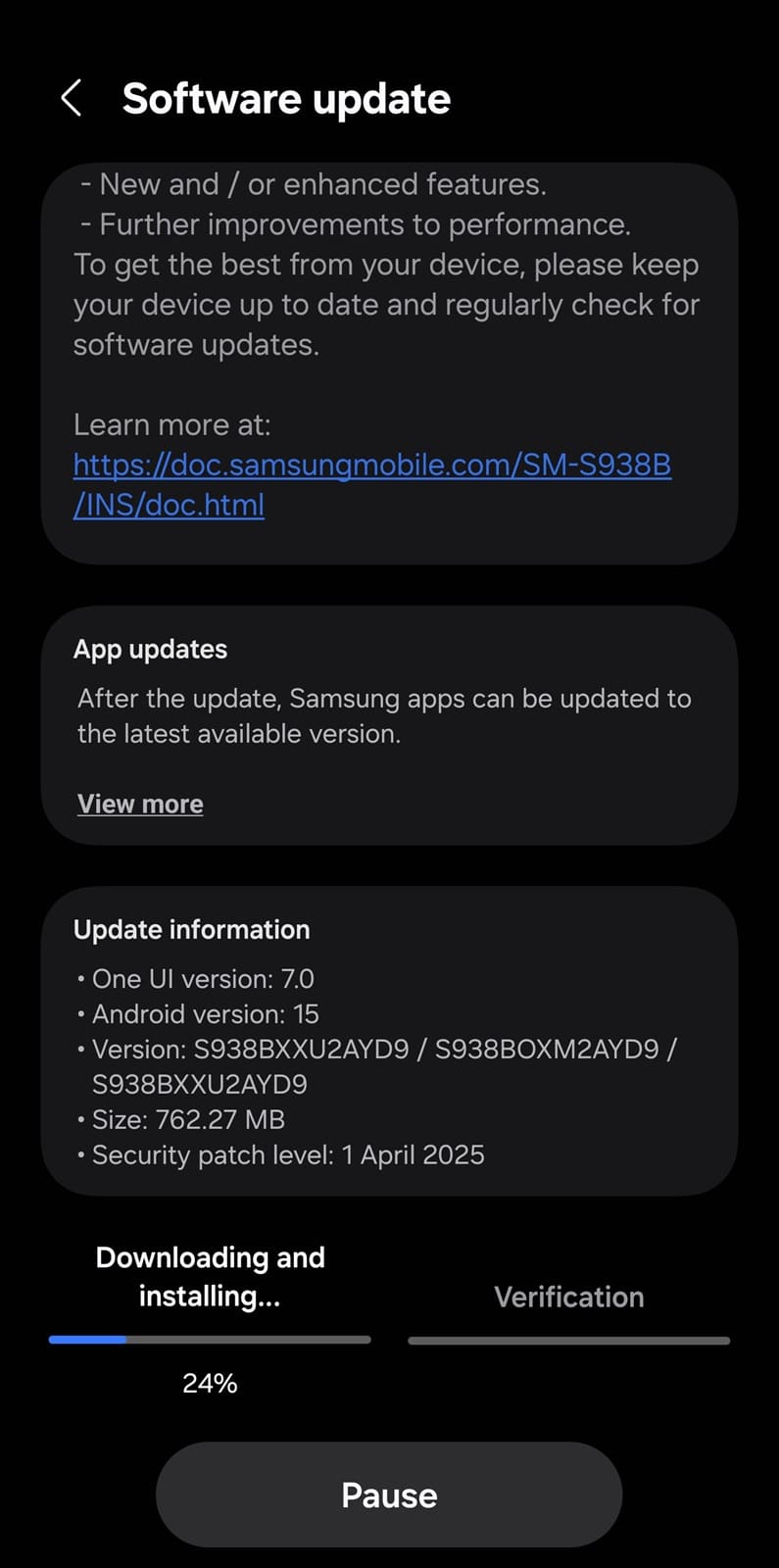
Of course, the April 2025 security patch is also part of the package, protecting your phone against the latest threats. This month’s security release addresses over 60 vulnerabilities across the Galaxy family, including a few critical ones. Samsung has already rolled out these fixes to several other Galaxy devices.
You can identify this update by a build number ending in AYD9. The exact file size will vary depending on the model and region — it weighs 762MB for the Indian Galaxy S25 Ultra. It shouldn’t exceed 1GB, though. To check if the April update is available on your Galaxy S25, go to Settings > Software update > Download and install. If it doesn’t show up, wait a few days and check again.

Written by
Sumit AdhikariSumit, a life-long Samsung user, is passionate about technology and has been professionally writing on tech since 2017. He’s a mathematics graduate by education and enjoys teaching basic mathematics tricks to school kids in his spare time. Sumit believes in artificial intelligence and dreams of a fully open, intelligent and connected world.

Follow us on Google Discover & set us as a preferred source in Google News
Share this Post
___________________________


New Blog Posts
___________________________
Google Wallet Finally Fixes One of Its Most Annoying Wear OS Quirks
Finally, one can manage all of my receipts from both devices

Samsung Quietly Listed a New Entry Level 990 PCIe 4.0 SSD
It drops DRAM for HMB

Samsung’s First Bone-Conduction Earbuds May Be Called Galaxy Able
Name hidden no more