Missed Galaxy S24 FE One UI 8.5 Beta Program? Here’s Your Second Chance

SammyGuru is reader-supported. We have affiliate and sponsored partnerships, so we may earn a commission when you buy through links on our site — at no extra cost to you. Learn more.
Samsung has been rolling out beta updates at full speed. Just yesterday, the Galaxy S24 FE received the second round of the One UI 8.5 beta update. That came a few weeks after the company first opened the beta program. Since these often fill up quickly, some of you may not have joined the Galaxy S24 FE’s One UI 8.5 beta program. Turns out, you might still be in luck.
Samsung is letting more Galaxy S24 FE users join One UI 8.5 beta
Samsung has expanded availability for its One UI 8.5 beta, allowing more Galaxy S24 FE users to take part. This move opens the testing program to additional devices, giving more users early access to upcoming features and improvements.
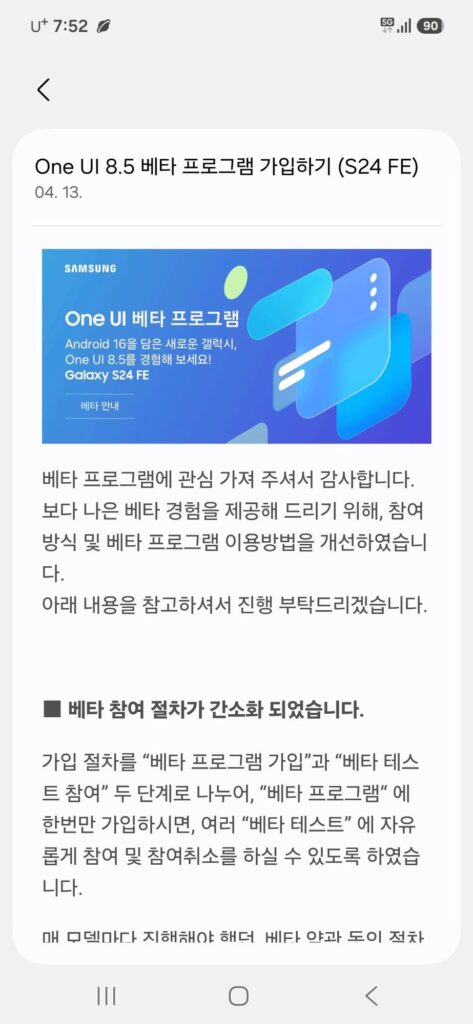
According to a post on Samsung’s Community forum in Korea (h/t SamMobile), a user shared a screenshot from the Members app showing that the company has started accepting more Galaxy S24 FE devices into the beta program. This suggests a broader rollout, at least in the region. We can’t confirm the same for more regions, at the moment.
How to join Galaxy S24 FE’s One UI 8.5 beta program?
- Open the Samsung Members app on your device
- Find and tap the One UI 8.5 beta program banner
- Register your Galaxy S24 FE for the beta
- Go to Settings > Software update > Download and install
- Install the update once it becomes available
Once you’ve updated, head to the Galaxy Store and update all your apps to ensure better compatibility with the new software. Keep in mind that beta versions are often unstable and may include bugs or performance issues. It’s best not to install them on your primary device unless you’re comfortable dealing with potential glitches.

Written by
Abhinav AnandAbhinav Anand is the News Editor at SammyGuru and a technology journalist based in New Delhi. Before joining SammyGuru, he contributed to numerous outlets, including Android Headlines, ExtremeTech, The Mac Observer, Financial Express, Economic Times, iGeeksBlog, KnowTechie, PhonesWiki, SlashGear, and more. You can reach him at [email protected].

Follow us on Google Discover & set us as a preferred source in Google News
Share this Post
___________________________


New Blog Posts
___________________________

Samsung Adds Supergirl Collection to Art Store With Big Giveaway
Samsung pushes Supergirl launch with art, TVs, and giveaways

Samsung Secures Apple’s Nod to Make Foldable iPhone OLED Modules
This comes after the display maker proved its production quality
Galaxy S26 Ultra Hits Lowest Price in the US for Prime Day
Now’s the best time to buy the Galaxy S26 Ultra