Google Chrome for Android Finally Gets a Dedicated Back Button

SammyGuru is reader-supported. We have affiliate and sponsored partnerships, so we may earn a commission when you buy through links on our site — at no extra cost to you. Learn more.
Google is rolling out several quality-of-life improvements to Chrome on Android. One of them may seem minor, but it’s a feature the iOS app has had for a long time: a dedicated back button.
Chrome for Android finally adds a dedicated Back button in latest update
First spotted by 9to5Google, Google has finally added a dedicated Back button to Chrome for Android with version 150. It now sits alongside the Forward button, bringing the Android experience closer to what Chrome users on iOS and Windows have had for quite some time.
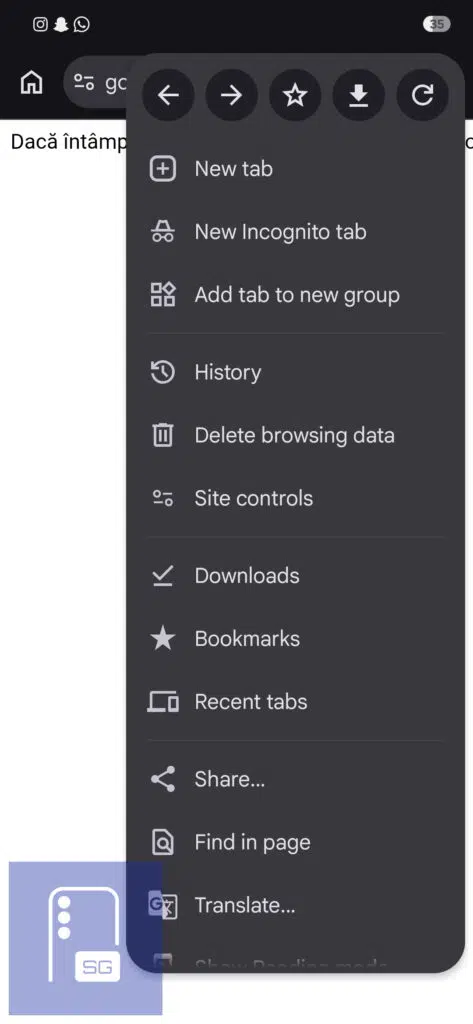
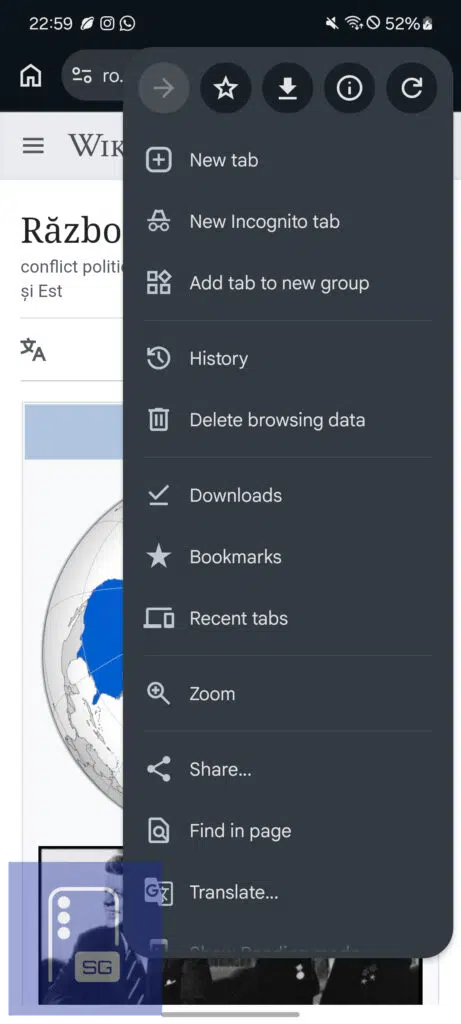
Until now, Chrome’s overflow menu only included a Forward button. Google expected users to rely on Android’s system back gesture or navigation button to return to previous pages. That may seem like a small change, but it can be especially useful when browsing one-handed. It’s also handy when using Chrome through Custom Tabs inside apps.
Small tweaks to the 3-dot menu
The new Back button isn’t the only interface change. Google has removed the old Info button from the menu and replaced it with a new Site controls option. It gives users quicker access to permissions and settings for the current website. However, it also makes Chrome’s already crowded overflow menu a bit longer.
As a result, the Bookmark and Download buttons have shifted further to the right, which longtime Chrome users might need some time to get used to.
Chrome 150 also renames a familiar menu option. Instead of Add to Home screen, users will now see Install and create shortcut. The new label better reflects Chrome’s ability to install Progressive Web Apps (PWAs), while still letting users create traditional website shortcuts for pages that don’t support installation.
If the feature hasn’t appeared on your Galaxy device yet, it’s likely part of Google’s staged rollout. Even after updating to Chrome 150, the dedicated Back button may take some time to show up.
To update Google Chrome manually, open the Google Play Store, search for Google Chrome, and tap Update. While this isn’t Chrome’s biggest update of the year, it’s one of those quality-of-life improvements many Android users have been asking for.

Written by
David BuligaDavid Buliga is a Romanian writer at SammyGuru, where he covers the Samsung and Android ecosystem with a focus on apps, software features, and the trends shaping how we actually use our devices — from Galaxy Watch apps to One UI 9, plus the occasional opinion piece. He joined SammyGuru in 2026 after previously creating entertainment content on YouTube, producing animations and gameplay videos. Currently pursuing a Bachelor's degree in Applied Electronics and Telecommunications, David is passionate about consumer technology and enjoys getting under the hood of smartphones to see what makes them tick. Outside of tech, he loves listening to music, reading books, photography, and exploring the random ideas that often inspire his next story.

Follow us on Google Discover & set us as a preferred source in Google News
Share this Post
___________________________


New Blog Posts
___________________________
Google Photos Rolls Out New Floating Bottom Bar on Android
It floats
Introducing SammyGuru Rewards — Read, Earn, and Redeem
Our biggest update yet
Samsung’s Odyssey G8 Will Power Crimson Desert Demos at Gamescom 2026
In Cologne, August 36-August 30