
Galaxy S26 Ultra: How to Make Lens Switching Smoother in Video

Lens switching is one of the few things that still breaks the “pro” feel of video on the Galaxy S26 Ultra. On paper, the system is capable; it offers multiple focal lengths, fast autofocus, and strong stabilization. But in real-world use, moving between 1x, 3x, and 5x doesn’t always feel as smooth as the hardware suggests.
The issue isn’t constant, but it’s noticeable. Transitions can feel abrupt, focus may shift too aggressively, and the camera often reacts faster than your eye expects. It creates a subtle disconnect, where the footage looks sharp, but the behavior feels less controlled. And once you notice it, it becomes hard to ignore.
Why lens switching feels aggressive
By default, Samsung tunes the camera for speed. Fast focus acquisition, instant reaction, and minimal hesitation are all priorities. For photography, this makes perfect sense. You want the camera to lock quickly and capture the moment without delay.
In videos, however, that same behavior works against the experience. Instead of smooth transitions, you get sudden focus jumps and rapid adjustments as the system tries to maintain sharpness across changing scenes and lenses. It’s not a flaw in capability. It’s a matter of tuning, and you can control that.
The hidden controls that change everything
On the Galaxy S26 Ultra, Samsung quietly introduced new controls inside Camera Assistant: autofocus transition speed and shift sensitivity. These aren’t headline features, but they directly affect how the camera behaves during both photo and video capture.
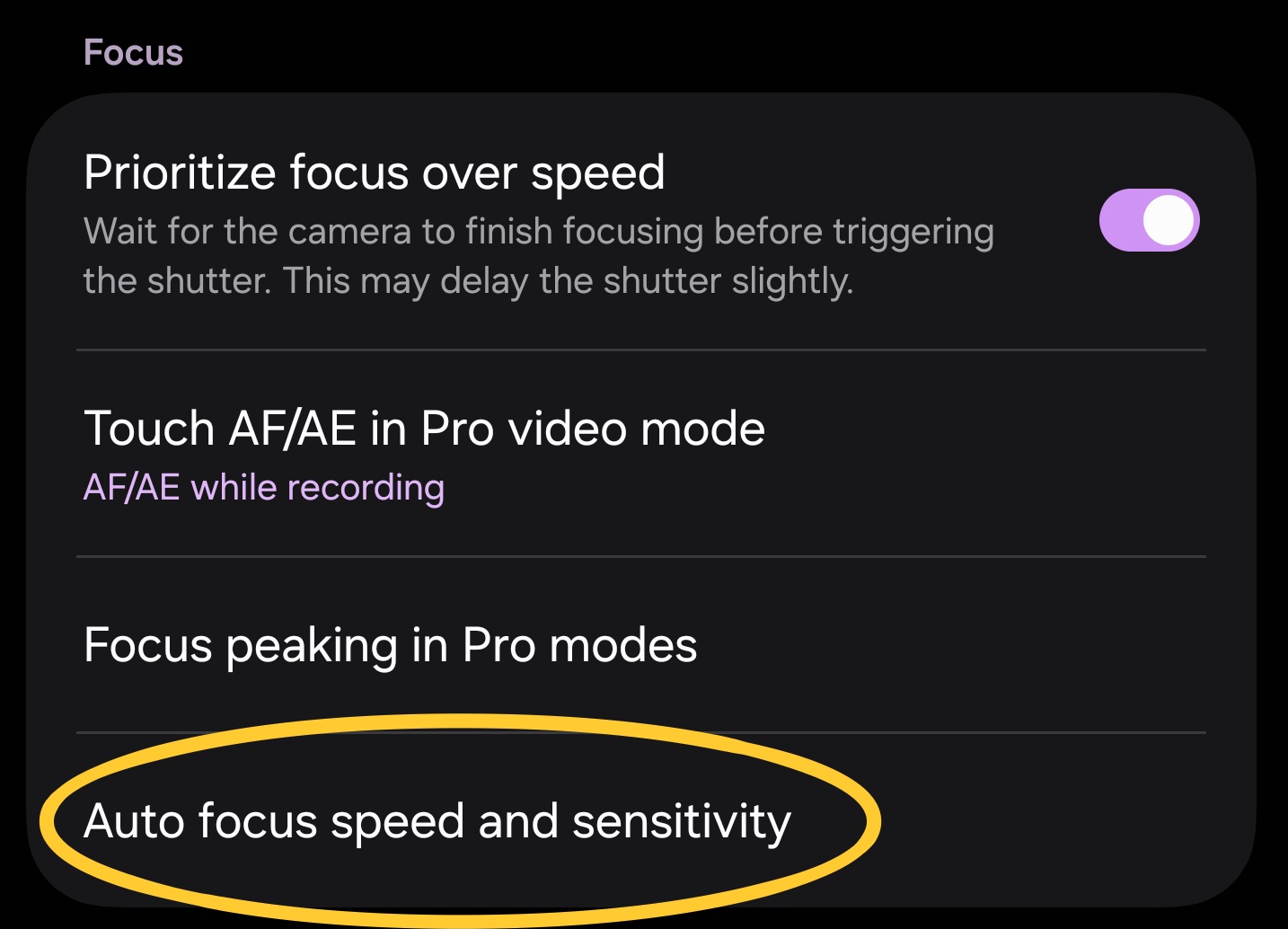
Camera assistant > Auto focus speed and sensitivity
Transition Speed controls how quickly the focus moves from one subject or one lens to another. Shift Sensitivity, meanwhile, determines how easily the camera decides to refocus when something changes within the frame.
Individually, they seem simple. Together, they define how the camera reacts to motion, depth, and lens switching.
From reactive to controlled behavior
Once these settings are adjusted for video, the difference becomes immediately clear. Lowering the transition speed slows down focus movement, turning abrupt jumps into smoother, more natural transitions between subjects and lenses.
Adjusting shift sensitivity further refines the behavior. Lower sensitivity makes the camera more stable, holding focus longer and avoiding unnecessary changes. Higher sensitivity allows faster reactions, but can reintroduce some of the aggressiveness seen in the default setup.
The setup that works in real use
After testing across different scenes, one combination consistently delivers the best balance between control and responsiveness. Setting the transition speed to very slow allows focus to move gradually, reducing the harshness of lens switching. Pairing this with fast shift sensitivity keeps the camera responsive enough to adapt when the scene actually changes.
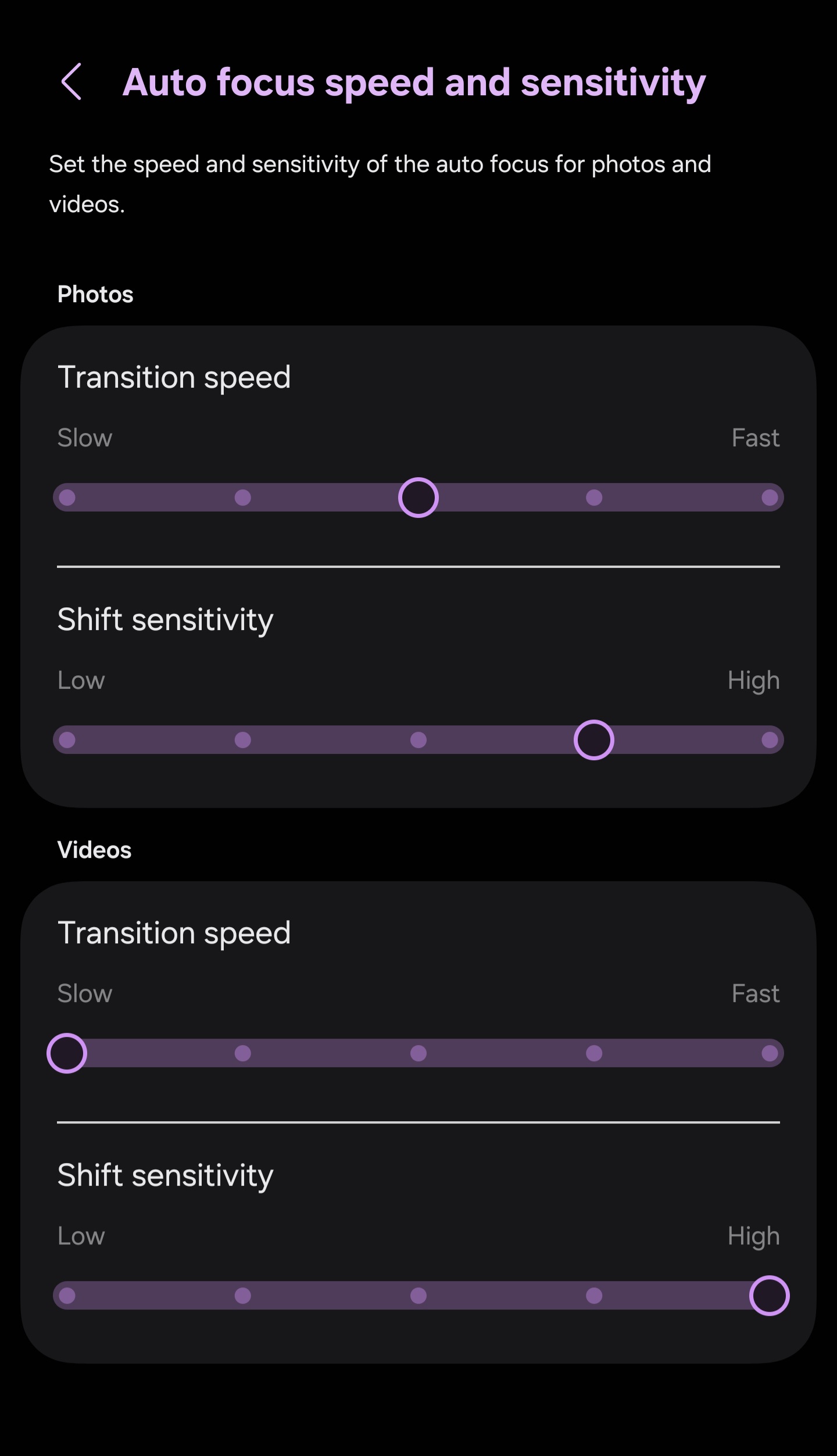
The result is smoother transitions, more natural focus movement, and footage that feels closer to a controlled, cinematic capture rather than a reactive system trying to keep up.
For a real-world example, you can check the full lens transition test in 4K HDR on YouTube, covering all focal lengths and how the system behaves during actual use.
Are there any limitations?
It’s important to be clear about the limitations. These adjustments do not eliminate lens switching behavior entirely. Differences between lenses, slight exposure shifts, and alignment changes are still present, especially when moving across focal lengths.
What this setup changes is how those transitions feel. Instead of snapping between states, the camera moves through them with more control. The system becomes less aggressive, even if the underlying hardware differences remain.
Why photos should stay unchanged
For photography, the default tuning remains the better choice. Fast focus, quick response, and immediate lock are essential for capturing still images, where timing matters more than motion consistency.
At the same time, increasing shift sensitivity to fast can further improve responsiveness in fast-moving situations without introducing unwanted side effects. Paired with a medium transition speed, it maintains quick focus behavior while adding a bit more stability to how the system reacts.
Slowing down focus behavior in photos would reduce reliability rather than improve it. In this case, Samsung’s default balance is intentional, but slight adjustments can still refine it depending on how you shoot.
This is one of those features that doesn’t look important until you use it. The Galaxy S26 Ultra doesn’t just give you multiple cameras, but it also gives you control over how those cameras behave. And in video, behavior matters just as much as image quality. Because smooth transitions, controlled focus, and natural movement are what make footage feel cinematic.

Follow us on Google Discover & set us as a preferred source in Google News
Share this Post
___________________________


New Blog Posts
___________________________

World Cup 2026 Could Decide Samsung vs Hisense MiniLED Battle: Counterpoint
Samsung leads MiniLED race, but World Cup may flip it, says Counterpoint
Galaxy S25 FE Drops to $449 in Solid 31% Discount Deal
Galaxy S25 FE gets a nice price cut to $449

Samsung says Foundry May Not Turn Profitable Before 2028
Samsung foundry boss says recovery will take time


